CRM Data Enrichment: A Practical Guide for Modern Revenue Teams
Table of Contents
Explore Bitscale
Find decision makers, more insights and contact information about this company on Bitscale
CRM data enrichment gets talked about constantly in RevOps, and still manages to be widely misunderstood. A lot of teams treat it like a one-off cleanup: upload a CSV, backfill a few emails, call it done. That model was fine several years ago. It breaks now. B2B contact data degrades steadily, with industry research consistently showing that a significant portion of any CRM database becomes unreliable within a single year due to job changes, company restructuring, and normal business churn. Surveys of CRM users reinforce this reality: most organizations report that less than half of their CRM data is both accurate and complete, and a meaningful share attribute direct revenue loss to poor data quality.
This guide treats CRM data enrichment the way it plays out in real revenue teams: as an ongoing, multi-layer discipline. You'll see which enrichment layers actually matter for B2B execution, how to roll them out without creating new failure modes, where AI earns its keep (and where it doesn't), and how to pressure-test vendors. If you're a RevOps leader building governance or a sales manager tired of watching reps burn hours on manual research, the sections below are designed so you can read straight through or jump to the piece you need.
What CRM Data Enrichment Actually Means (Beyond Missing Emails)
Most definitions of CRM enrichment stop at appending missing contact details: work emails, phone numbers, job titles. That's only a small part of the job. In B2B, enrichment is the ongoing work of validating, correcting, expanding, and linking CRM records so every team operating out of the CRM (sales, marketing, CS, finance) can trust the data and act without second-guessing every field.
As IBM's overview of data enrichment explains, enrichment spans demographic, firmographic, geographic, and behavioral dimensions. For revenue teams, that usually translates to: contact enrichment (verified emails, direct dials, role data), company enrichment (parent-subsidiary mapping, headcount, funding), firmographic enrichment (industry codes, revenue bands, geography), technographic enrichment (tech stack detection), buying signals (hiring surges, funding rounds, leadership changes), and relationship intelligence (who knows whom, meeting history, engagement patterns). Then there's the unsexy work that keeps everything usable: duplicate detection, record validation, and CRM data cleansing.
If enrichment is just "fill in the blanks," the real structural issues stay put: duplicates that split account history, stale records that trigger irrelevant outreach, and missing firmographics that make segmentation and routing a guessing game. CRM data management is the umbrella; enrichment is the mechanism that keeps the system from drifting into chaos.
The Real Cost of Poor CRM Data Quality
Industry analysts, including Gartner, have consistently found that poor data quality is one of the largest hidden cost centers in enterprise organizations, draining millions annually through failed outreach, misallocated resources, and flawed decision-making. That figure feels theoretical until you map it to day-to-day execution. Reps dial dead numbers. Marketing emails people who left months ago. Territory rules break because industry codes are missing or inconsistent. Forecasts start to wobble because opportunity fields are half-filled and no one trusts the rollup.
Sales teams already lose a substantial portion of the week to non-selling work like manual data entry, with multiple studies confirming that reps spend far more time on administrative tasks than on actual selling activities. Every minute spent checking a tech stack, verifying a phone number, or untangling whether two "Acme Corp" records are the same company is time that isn't moving pipeline. The upside is just as real: organizations with high-quality, enriched CRM data consistently report measurable gains in revenue performance, campaign response rates, and pipeline velocity compared to peers relying on degraded databases. For more context on what actually drives those improvements, see our comprehensive CRM data quality guide.
The Layers of CRM Enrichment That Actually Drive Revenue
Enrichment isn't one thing, and not every layer pays off the same way. The table below ties each enrichment type to the business outcome it most directly supports, plus the teams that feel the impact first. Use it as a prioritization tool: start where your CRM gaps are creating the most operational drag.
| Enrichment Type | What It Adds | Primary Business Value | Key Beneficiaries |
|---|---|---|---|
| Contact Enrichment | Verified emails, direct dials, job titles, seniority | Faster prospecting, higher connect rates | SDRs, AEs |
| Company Enrichment | HQ location, subsidiaries, funding, employee count | Better account prioritization and routing | AEs, RevOps |
| Firmographic Enrichment | Industry, revenue range, company type, geography | Accurate segmentation and ICP targeting | Marketing, RevOps |
| Technographic Enrichment | Current tech stack, tools used, contract renewal windows | Competitive displacement, solution fit scoring | AEs, Product Marketing |
| Buying Signals | Hiring surges, funding rounds, leadership changes, job postings | Timely outreach to in-market accounts | SDRs, AEs, Marketing |
| Relationship Intelligence | Meeting history, email engagement, mutual connections | Multi-threading, warm introductions | AEs, CS |
| Duplicate Detection | Merged records, canonical account IDs | Clean pipeline reporting, accurate attribution | RevOps, Finance |
| Validation & Cleansing | Bounce-checked emails, standardized fields, flagged stale records | Reduced bounce rates, reliable automation triggers | Marketing, RevOps |
| Prioritize enrichment types based on your team's most painful data gaps. |
One of the most common failure modes is over-investing in contact enrichment while leaving firmographic and technographic coverage thin. You end up with a CRM full of accurate emails tied to accounts you still can't segment, score, or route with confidence. These layers depend on each other. Contact data without company context is basically a phone book. If buying signals are the lever you care about most right now, read our guide on how to identify and use buying signals.
Manual CRM Maintenance vs. AI-Powered Enrichment
Most teams begin with manual enrichment because it feels safe and controllable. A rep searches a prospect, updates a couple fields, and keeps moving. That can hold together at a small scale. As your database grows into the tens of thousands of records, it turns into a bottleneck. Here's how manual maintenance stacks up against AI-powered enrichment on the dimensions RevOps actually cares about.
| Dimension | Manual Maintenance | AI-Powered Enrichment |
|---|---|---|
| Speed | Minutes per record | Seconds per record, thousands in parallel |
| Consistency | Varies by rep; formatting inconsistencies common | Standardized output, uniform field formatting |
| Coverage | Limited to what the rep can find and remembers to enter | Pulls from multiple data sources simultaneously |
| Freshness | Snapshot at time of entry; decays immediately | Continuous or scheduled refresh cycles |
| Duplicate Handling | Rarely caught until pipeline reviews | Automated matching and merge suggestions |
| Scalability | Linear cost increase with database growth | Marginal cost per record decreases at scale |
| Error Rate | High (typos, wrong fields, outdated info) | Lower, with validation layers before write-back |
| CRM Hygiene | Reactive, usually during quarterly cleanups | Proactive, with real-time monitoring and alerts |
| AI-powered enrichment doesn't eliminate human judgment. It eliminates human drudgery. |
Moving from manual upkeep to AI CRM enrichment isn't about replacing people. It's about putting their time back where it belongs. Reps should be interpreting the signal in the data ("This account just raised Series C and is hiring three DevOps engineers, so our infrastructure product is relevant now") instead of spending their morning collecting it.
Where AI Fits and Where Humans Still Win
AI is strong at retrieval, pattern matching, deduplication, and field-level validation. It struggles with relationship nuance, strategic account judgment, and deciding whether a signal matters for your specific sales motion. The division of labor usually looks like this:
AI handles best:
- Bulk enrichment of contact and company records from multiple providers
- Real-time email and phone validation before CRM write-back
- Duplicate detection using fuzzy matching across name, domain, and address fields
- Technographic and firmographic data appending at scale
- Standardizing job titles, industry codes, and address formats
- Surfacing buying signals from public data (job postings, press releases, funding announcements)
Humans handle best:
- Qualifying whether a buying signal is relevant to a specific deal
- Mapping organizational relationships and political dynamics within an account
- Deciding which enrichment sources to trust when data conflicts arise
- Setting governance rules: which fields are mandatory, who can override, what triggers a review
- Interpreting enriched data in the context of an active sales conversation
The programs that work pair automation with tight oversight loops. Let AI propose updates, then route high-stakes records through human review (or allow overrides) where the cost of being wrong is real. For the long tail of low-touch records, automation with exception-based review is usually the right tradeoff.
Implementation: Building a CRM Enrichment Program That Lasts
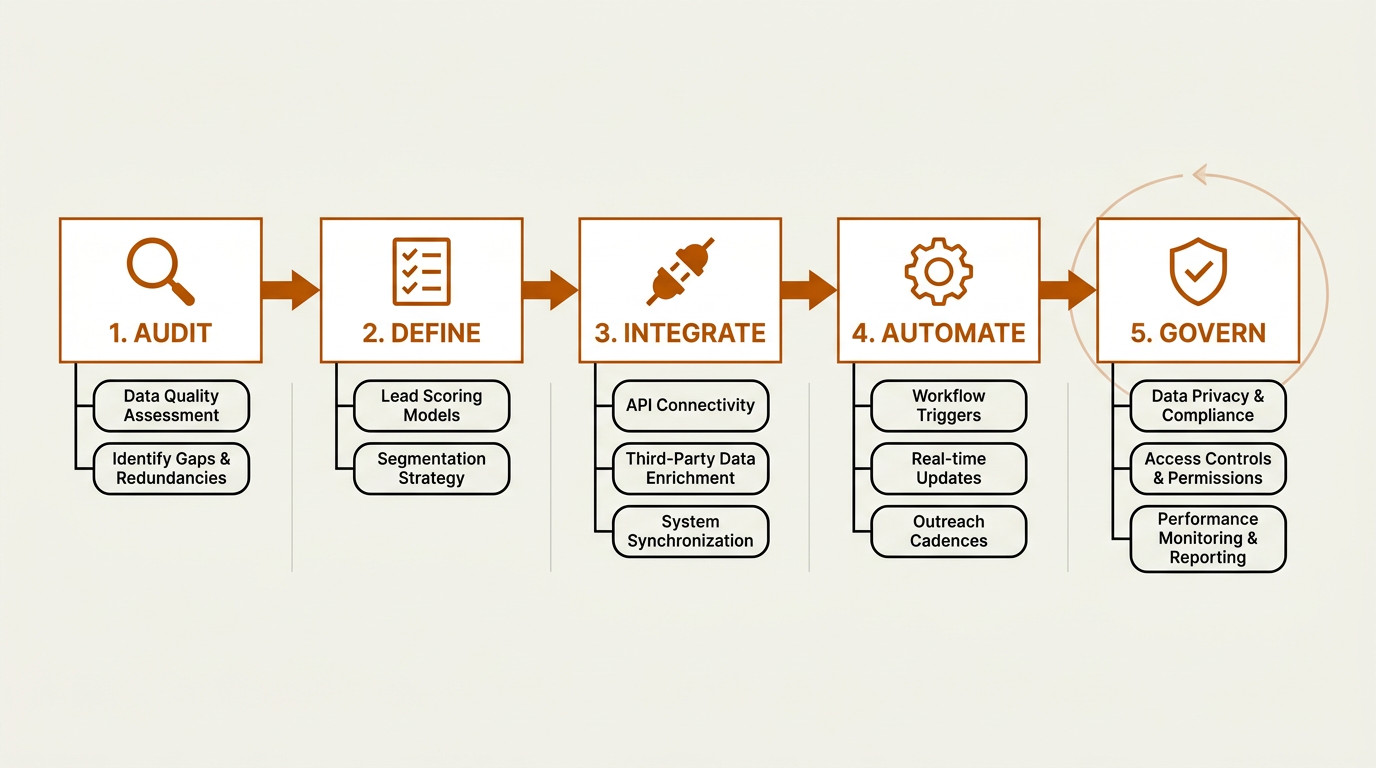
A durable enrichment program follows five sequential stages, with governance running continuously.
Step 1: Audit Your Current CRM State
Before you add another enrichment tool, get a field-level baseline. Export your CRM and measure completeness for every field that actually drives your go-to-market motions: email, phone, title, industry, employee count, tech stack, last activity date. Flag records with no recent activity. Calculate your duplicate rate. Many teams discover that a material share of their accounts have at least one duplicate, which is usually where reporting and routing start to fall apart. The exact threshold that signals a problem varies by organization, but any duplicate rate that visibly distorts pipeline reporting or territory assignments warrants immediate attention. This audit becomes the benchmark you use to prove (or disprove) enrichment impact later.
Step 2: Define Your Enrichment Schema
Get explicit about what you will enrich, what "good" looks like for each field, and how often that field needs to be refreshed. Job titles churn faster than revenue bands. Email addresses change faster than headquarters locations. Your refresh cadence should reflect how quickly each data type decays in your specific market and sales cycle. For example, contact data in fast-moving industries like tech or staffing may need monthly or even more frequent refreshes, while firmographic fields in stable sectors can often follow a longer cycle. The point is to let real-world decay patterns drive your schedule, not an arbitrary calendar date. For detailed guidance on field selection and cadence, see our guide on CRM enrichment at scale.
Step 3: Choose and Integrate Your Enrichment Stack
This is where teams tend to spend the most money while making the least progress: buying three or four point solutions that each cover a narrow slice. One tool for contact lookup, another for technographics, a third for intent, a fourth for dedupe. What you get is a brittle stack with conflicting values, overlapping spend, and no clear source of truth. Platforms like Bitscale's Data Enrichment product consolidate AI prospect research, contact and company enrichment, buying signals, and CRM sync into a single workflow, which reduces integration overhead and limits data conflicts.
Step 4: Automate with Guard Rails
Automation without guard rails is how you overwrite a rep's carefully verified info with stale third-party data. Set the rules up front: which fields can be auto-updated, which require approval, and what happens when the enrichment source disagrees with the existing CRM value. Mature programs usually rely on a confidence-score threshold calibrated to their own data environment. Records that score above the organization's chosen confidence level get written back automatically; those below it get routed for human review. The right threshold depends on your tolerance for error and the sensitivity of the field in question. High-stakes fields like account ownership or deal stage deserve stricter controls than supplementary firmographic attributes.
Step 5: Establish Ongoing Governance
Governance is the part most teams postpone, then pay for later. Assign a data steward (or a small team in larger orgs). Make ownership clear by object type. Set a regular review cadence. Track coverage and accuracy over time. Without governance, enrichment becomes another input of entropy instead of the thing that keeps the CRM healthy.
Common Mistakes That Undermine CRM Enrichment
Treating enrichment as a one-time batch job. You clean the CRM in January, feel good about it, and within a few months you're back to bounced emails and misrouted accounts. Enrichment has to run continuously. Put refreshes on a schedule that matches how fast each field decays.
Enriching everything without prioritization. Not every record deserves the same investment. Tier your accounts and spend enrichment credits where it matters: ICP-fit accounts and active pipeline first. Dormant, low-fit records can sit until there's a reason to touch them.
Ignoring field-level conflict resolution. When your enrichment source says the title is "VP of Engineering" but the CRM says "SVP of Engineering" because a rep updated it after a call last week, which value wins? If you haven't defined the rule, you'll overwrite accurate human input with older third-party data. That's the fastest way to lose rep trust in the CRM.
Skipping deduplication before enrichment. Enriching duplicates means paying twice for the same entity and ending up with two "improved" records that still split attribution and reporting. Dedupe first, then enrich.
Measuring volume instead of impact. "We enriched 50,000 records" is activity, not an outcome. Track whether enrichment is improving the metrics that matter to your revenue engine: email deliverability, speed to first touch, pipeline velocity, forecast accuracy, and routing precision. Those outcomes tell you whether enrichment is improving execution.
Evaluating CRM Enrichment Vendors
The enrichment vendor market spans point solutions (Clay, Lusha, Cognism), broader sales intelligence platforms (Apollo.io), outbound-first tools (Instantly.ai), and unified GTM platforms like Bitscale that bundle enrichment with prospect research, workflow automation, and revenue intelligence. The right choice comes down to how much of the workflow you want under one roof versus stitched together across tools.
| Criterion | What to Assess | Red Flags |
|---|---|---|
| Data Coverage | Geographic, industry, and company-size coverage for your ICP | Vendor can't provide sample match rates against your actual CRM |
| Accuracy & Freshness | How often data is verified; real-time vs. cached lookups | No published methodology for data verification |
| CRM Integration Depth | Native sync, field mapping, bi-directional updates, conflict rules | CSV export only; no native CRM connector |
| Enrichment Breadth | Contact, company, firmographic, technographic, intent, signals | Only covers one or two data types; requires bolt-on tools for the rest |
| Duplicate Management | Fuzzy matching, merge rules, canonical record selection | No dedup capability; treated as out of scope |
| Governance Controls | Field-level permissions, approval workflows, audit logs | No role-based access; all-or-nothing automation |
| Pricing Transparency | Per-record, per-seat, or platform fee; overage handling | Opaque credit systems with unclear consumption rates |
| Compliance | GDPR, CCPA readiness; opt-out handling; data sourcing transparency | Cannot explain where their data comes from |
| Run a structured evaluation before committing to any enrichment vendor. |
A practical way to evaluate vendors: export a representative sample of CRM records (mixing clean and messy data in proportions that reflect your actual database), run a trial enrichment with each provider, then score match rate, accuracy, and field coverage against your schema. The sample size should be large enough to give you confidence in the results but manageable enough to evaluate quickly. Coverage claims on a slide deck don't matter if they don't hold up against your database. For a broader view of the strategy behind all of this, our Complete B2B Guide to Data Enrichment covers the full landscape.
Building a Governance Framework for Long-Term CRM Health
Governance can sound like bureaucracy. In practice, it's what separates a CRM that improves over time from one that keeps degrading no matter how much enrichment you buy. A usable governance framework answers four questions: Who owns each data object? What rules control creation, updates, and deletions? How do we measure data health? What happens when someone breaks the rules?
Start by assigning ownership clearly. In many orgs, marketing owns leads, sales owns contacts and opportunities, and RevOps owns accounts and the overall data model. Then define mandatory fields by lifecycle stage (you don't need full firmographics on a raw lead, but you do need them before an account enters pipeline). Keep the reporting simple: a data health dashboard that tracks completeness, freshness, duplicate rate, and bounce rate. Review it on a regular cadence that fits your team's rhythm. When a metric drops below the threshold your organization has set, look for the root cause instead of just running another enrichment batch.
Bitscale's approach to data enrichment solutions builds governance into the workflow itself, using field-level sync controls and CRM write-back rules to avoid the "enrich and pray" behavior that leaves teams with more noise instead of more signal.
Key Takeaways
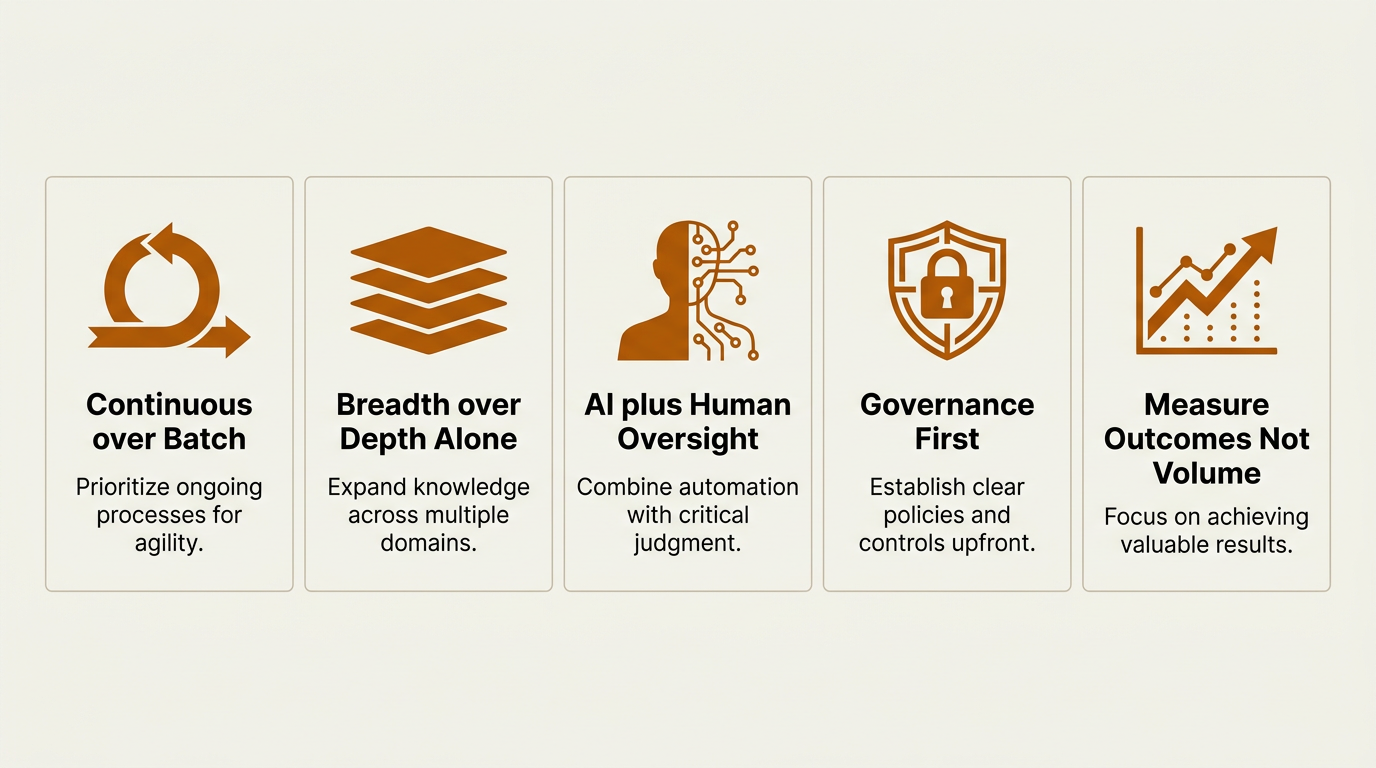
Five principles that separate effective CRM data enrichment programs from expensive, low-impact data projects.
- Treat CRM data enrichment as an ongoing operating rhythm, not an annual cleanup. Set refresh cadences that match how fast each field decays in your specific market and sales cycle.
- Fund the full stack of enrichment (contact, company, firmographic, technographic, buying signals, relationship intelligence) instead of only backfilling contact fields.
- Use AI for scale and consistency, and keep humans in the loop for strategic accounts, conflict resolution, and governance.
- Deduplicate before you enrich. Paying to enrich duplicate records burns budget and makes reporting harder.
- Judge enrichment by business outcomes (deliverability improvements, faster time-to-first-touch, pipeline velocity, forecast accuracy), not by the number of records processed.
- Test vendors against your CRM with real records, not theoretical coverage. Platforms that unify enrichment, signals, and CRM sync reduce integration overhead.
Frequently Asked Questions
How often should CRM data enrichment run?
It varies by field and by your organization's sales cycle. Contact data (emails, phone numbers, job titles) typically needs more frequent refreshes because people change roles regularly. Firmographic fields (industry, revenue, headcount) move more slowly and can follow a longer cycle. Buying signals and technographics are most useful when monitored frequently, often weekly or near real time. The goal is to match refresh frequency to each field's observed decay rate and your team's operational needs, not to run a single annual bulk update.
What is the difference between CRM data cleansing and CRM data enrichment?
Cleansing fixes what you already have: removing duplicates, correcting formatting, standardizing values, and flagging invalid records. Enrichment adds net-new context, like technographics, firmographics, or buying signals. In practice they work as a pair. Cleansing stabilizes the foundation; enrichment builds on it. If you enrich on top of messy data, you usually scale the mess.
Can small teams benefit from AI-powered CRM enrichment?
Yes. Small teams often feel the pain sooner because there are fewer people to absorb manual research. If a small sales team spends a significant portion of each day verifying data, that's a meaningful chunk of selling capacity gone. Platforms like Bitscale are built to automate prospect research, contact and company enrichment, and CRM sync without requiring a dedicated RevOps team to keep it running.
How do I prevent enrichment tools from overwriting accurate CRM data?
Define field-level write rules before you turn on automation. Common patterns include writing only to empty fields (never overwriting existing values), using confidence-score thresholds calibrated to your data environment (auto-write above your chosen confidence level, flag for review below), and marking certain fields as "human-owned" (like notes or custom relationship fields) that enrichment tools cannot touch. Mature CRM enrichment platforms support these controls natively.
What should I look for when comparing CRM enrichment vendors?
Start with a real-data test: send a representative sample of CRM records and measure match rate, accuracy, and field coverage against your schema. Then evaluate integration depth (native sync vs. CSV export), breadth (contact, company, firmographic, technographic, and signals), governance controls (field permissions, audit logs), and pricing transparency. Be cautious with vendors that can't explain their data sourcing methodology or rely on opaque credit systems.

Sanket
CEO | Co-Founder Bitscale


Sanket is the CEO and Co-Founder of Bitscale. He leads company vision and strategy, building the future of AI-driven sales intelligence for modern B2B teams. Sanket is obsessed with the intersection of AI and go-to-market, and has spent years studying how the best B2B companies find, engage, and convert customers at scale. He writes about company building, product strategy, and where AI is taking the sales industry.
Read other blogs
All Blogs
12 Best CRM Sync Tools for Revenue Teams in 2026
Compare 12 CRM sync tools for Salesforce and HubSpot, including enrichment, reverse ETL, and automation options for cleaner revenue data.
Sales Data Enrichment: A Buyer's Guide for Modern B2B Teams
Sales data enrichment helps B2B teams improve CRM records, routing, prospecting, and account prioritization. Compare workflows, costs, and vendor fit today.
What Is AI Prospect Qualification? A Practical Guide for Modern Revenue Teams
AI prospect qualification helps revenue teams enrich data, assess ICP fit, prioritize buying signals, and route the right accounts into CRM workflows.