What is technographic data? How B2B teams sell to the stack
Table of Contents
Explore Bitscale
Find decision makers, more insights and contact information about this company on Bitscale
Most teams treat technographic data as a filter: pull "companies using Salesforce", export, call it targeting. I think that wastes the most useful part of the data. Knowing a company runs a tool tells you it could be a fit. Knowing it just started or stopped running a tool tells you when to call. The second one is where the pipeline is.
The short answer: technographic data describes the technologies a company uses: its CRM, ecommerce platform, analytics, cloud and the products of your competitors. B2B teams use it for three jobs: targeting accounts whose stack fits your product, displacing a competitor's tool, and timing outreach around stack changes. It is collected mostly by scanning public website code and by reading job postings, and it is never perfectly accurate, so treat it as a strong hint rather than a fact. Bitscale is how I'd put it to work: pick up the tech stack signal, find the decision-makers, verify their emails and phones through an 18+ provider waterfall, and sync the result to HubSpot or Salesforce.
What technographic data is
Technographic data is information about the technology a company uses.
In practice, a technographic record can hold four kinds of information:
- Installs: the company uses Shopify, HubSpot, Snowflake or Kubernetes.
- Changes: it started or stopped using a technology, and roughly when.
- Depth and spend: how widely a tool is deployed, or an estimate of what the company spends on a category.
- Context: the category a tool belongs to, so you can find "any company on a marketing automation platform" rather than one vendor at a time.
My take: installs are table stakes. Changes are what separate a list from a signal.
Firmographic vs technographic vs intent data
People search for "firmographic and technographic data" together because the two are almost always used together. Intent data is the third layer. Each answers a different question.
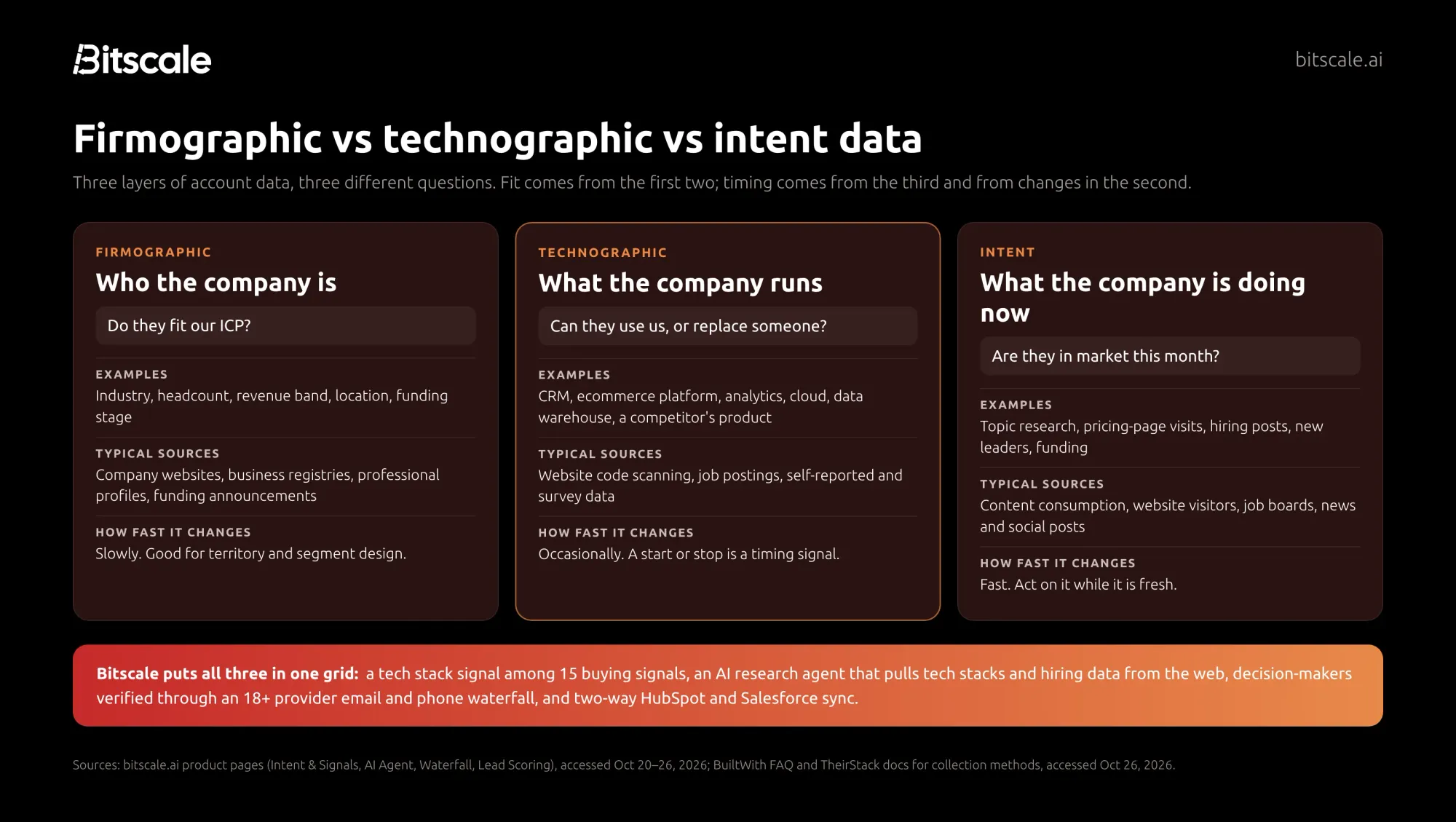
| Firmographic data | Technographic data | Intent data | |
|---|---|---|---|
| Question it answers | Do they fit our ICP? | Can they use us, or are they on a competitor? | Are they in market now? |
| Examples | Industry, headcount, revenue band, location, funding stage | CRM, ecommerce platform, analytics, cloud, data warehouse | Topic research, pricing-page visits, hiring posts, new leaders |
| Typical sources | Company websites, registries, professional profiles | Website code scanning, job postings, modeled data | Content consumption, website visitors, job boards, news |
| How fast it changes | Slowly | Occasionally | Fast |
| Best use | Territories and segments | Fit, displacement, timing | Prioritizing this week's outreach |
Firmographics and technographics tell you who should buy; intent tells you who might buy soon. A stack change is technographic data that behaves like an intent signal. I've written separately about the difference between intent data, enrichment data and sales signals if you want the longer version.
In Bitscale, the three layers live as columns in the same grid. Lead scoring takes firmographic fit (headcount, industry, revenue band) and technographic fit as inputs, adds buying signals, and lets scores decay as signals age.
How B2B teams use technographic data
Targeting by tech stack
The simplest use. If your product plugs into Shopify, companies running Shopify are your addressable market. Technographic filters cut a generic industry list down to accounts where your product can work.
What most teams get wrong here is stopping at the account. A list of domains is not pipeline. You still need the people who own that tool, and verified ways to reach them.
Competitive displacement
If you know which accounts run a competitor's product, you can build a displacement play. It works best when you pair the install with something that suggests friction, such as a new leader in the team that owns the tool, or job posts asking for experience with a different product.
My take: displacement lists without a timing trigger mostly produce polite "we're happy with what we have" replies. The install is the who. You still need a why now.
Timing via stack changes
This is the use I'd prioritize. When a company adds a technology, it is often building around it and buying adjacent tools. When it drops one, a budget line may be open. Providers now sell this directly: BuiltWith offers usage alerts when a list of websites starts or stops using a technology, Wappalyzer offers website alerts that track technology changes, and TheirStack sends alerts when a company starts or stops mentioning a technology in its job postings.
Scoring, routing and personalization
Technographic fit belongs in your lead score: an inbound lead from a company running a tool you integrate with should jump the queue. Bitscale's buying signals feed scoring alongside firmographic fit, which is the setup I describe in the lead intelligence platform guide. For the wider list of triggers worth tracking, see what buying signals are.
How technographic data is collected
There are three main methods. Most providers lean on one, and the method decides what the data can and cannot see.
1. Website scanning. A crawler loads a company's website and looks for fingerprints that a technology leaves behind: script tags, cookies, HTTP headers, meta tags and DNS records. BuiltWith's FAQ says every website gives off "signals" of the technologies it uses and that it indexes the internet "in the same way that Google does". Wappalyzer describes turning public web signals into technographic data. It works well for anything that touches the browser, such as analytics, chat widgets and ecommerce platforms.
2. Job postings. When a company hires a "Salesforce administrator" or asks for "experience with dbt and Snowflake", it is telling you what it runs internally. TheirStack's documentation says it infers technology usage from job postings and processes over 348k jobs per day from 365k sources. It sees internal tools that never appear on a website, such as data warehouses and ERPs.
3. Modeled and third-party data. Some providers combine many datasets to estimate installs, deployment depth and IT spend. HG Insights says its data enrichment is sourced from over 20 billion 2nd and 3rd-party datapoints. It is the hardest method for a buyer to audit.
You can also research it yourself, which is what Bitscale's AI research agent does: it scrapes websites and runs Google and Perplexity research to pull tech stacks, funding and hiring data into structured columns.
The accuracy limits nobody puts on the pricing page
I'd rather you trust technographic data the right amount than too much. Here are the limits I'd plan around:
- Websites only show the front end. Scanning catches the tag manager, not the data warehouse. A company can run a CRM for years without a single trace of it on its website.
- Detection is not usage. A script left over from a trial looks the same as a tool the whole company uses. Seeing an install doesn't tell you who owns it, how deeply it is used, or when the contract renews.
- Job posts are aspirational and lagging. A posting can list tools the team wants to adopt, tools it is moving away from, or tools copied from an old description.
- Providers disagree. Different methods produce different answers for the same company. When two sources conflict, I'd surface both instead of picking one silently.
- Freshness varies. Ask how often a provider re-checks a company, and whether it records first-seen and last-seen dates.
The practical answer is to combine methods, and to confirm the accounts you're about to spend real effort on.
Technographic data providers
These five cover the main collection methods. Bitscale is first because it is the one that turns the signal into contacts and CRM records. The others are specialist data sources, and several of them can sit upstream of Bitscale.
| Provider | Main method | Best for |
|---|---|---|
| Bitscale | Tech stack signal, AI web research, job-listing signals, plus contact waterfall | Activating technographic signals with verified contacts in your CRM |
| BuiltWith | Website scanning | Broad web technology coverage and history |
| Wappalyzer | Website scanning | Technographic lead lists and change alerts at a lower entry price |
| HG Insights | Combined and modeled data | Enterprise install, spend and market sizing |
| TheirStack | Job postings | Back-office and engineering stacks, hiring signals |
1. Bitscale: best for turning a tech stack signal into pipeline
Bitscale is the GTM data layer for your CRM: not a technographic database, but where the stack signal meets everything you need to act on it. Its intent and signals product tracks 15 buying signals, including tech stack, hiring posts, LinkedIn job listings, careers pages and job boards, and lets you stack them, for example a Series B plus SDR hiring plus a new VP Sales. Bitscale's docs also show how to pull LinkedIn job listings into a grid through its Apify integration.
Then comes the part a technographic database leaves to you: finding decision-makers and verifying how to reach them. Bitscale's Data Waterfall runs across 18+ contact-data providers, with 95% email and phone coverage and bounce rates below 0.5%, and syncs two ways with HubSpot (Growth plan) and Salesforce (Booster plan), writing back only changed fields.
- Pricing: free plan with 200 credits; Growth $349/mo ($314 billed annually); Booster $799/mo ($719 annually); Enterprise from $15K/yr. See pricing.
- G2: 4.8/5.
Choose Bitscale if you already know which tools signal a good fit and you want those accounts turned into verified contacts and CRM records without stitching three tools together.
2. BuiltWith: best for broad web technology coverage
BuiltWith says it tracks 127,972 web technologies, with data from 491.9 million domains updated weekly and history going back 41 years. Plans include usage alerts when websites start or stop using a technology, website spend estimates, and CRM integrations including Salesforce and HubSpot. Single-site lookups are free; paid plans are listed at $295, $495 and $995 per month.
Best for: teams that need wide coverage of front-end and ecommerce technologies and long adoption history.
3. Wappalyzer: best for technographic lists and alerts at a lower entry price
Wappalyzer, founded in 2008, says it tracks thousands of web technologies across millions of websites and is available through its website, APIs and a browser extension. It offers lead lists by technology, technology lookups, website alerts for stack changes and CRM enrichment. A free account includes 50 technology lookups a month; paid plans are listed at $250/mo (Pro), $450/mo (Business) and $850+/mo (Enterprise).
Best for: smaller teams that want technology-based lists and change alerts without an enterprise contract.
4. HG Insights: best for enterprise install and spend data
HG Insights describes HG Fabric as resolving firmographic, technographic, spend, buyer intent and contact data across 70M+ companies into one entity, and lists use cases including competitive displacement, whitespace analysis and market sizing. Pricing is not published on its homepage.
Best for: enterprise teams that want IT spend and install data for territory planning and market sizing.
5. TheirStack: best for stacks you can't see from a website
TheirStack builds technographic data from job postings. Its docs say it tracks 33k technologies across 12M companies, aggregating listings from job boards including LinkedIn, Indeed and Greenhouse across 195 countries, and it sends alerts by webhook, Zapier, N8N or Make when a company starts or stops mentioning a technology. A free account includes 50 company credits and 200 API credits; API plans start at $49/month for 1,500 API credits.
Best for: finding companies by internal tools such as data warehouses, ERPs and developer infrastructure.
If you are weighing a contact database with technographic filters instead, my Datanyze review covers that route.
Here's what I'd do: a five-step technographic play
- Write down the tools that matter: integrations (fit), competitors (targets) and disqualifiers.
- Pick the method for each tool: website scanning for front-end tools, job postings or research for internal ones.
- Track changes, not just installs. Set alerts or a recurring refresh so a start or stop becomes a row you can act on.
- Stack the signal. A stack change on its own is a hint. A stack change plus a new leader or a relevant hiring post is a reason to call this week.
- Activate it. Find the people who own the tool, verify their contact details, and write everything back to the CRM with the signal attached, so the rep sees why the account is on their list.
How Bitscale helps
This is the gap we built Bitscale to close. A technographic provider tells you which accounts. Bitscale runs the rest of the play in one grid:
- Pick up the signal. Track the tech stack signal among 15 stackable buying signals, next to hiring posts and LinkedIn job listings, or bring in a list from any provider.
- Research what the list misses. The AI research agent scrapes websites and runs Google and Perplexity research for tech stacks, funding and hiring data when your provider has a gap.
- Find the decision-makers. Pull the people who own the tool, then run them through the email and phone waterfall across 18+ providers, with 95% coverage and bounce rates below 0.5%.
- Score and route. Combine technographic fit with firmographic fit and live signals in a lead score that decays as signals age.
- Sync to the CRM. Two-way HubSpot sync from Growth and Salesforce sync from Booster, writing back only changed fields.
Teams already use this pattern for signal-led outbound. Sayan Das, Head of Outbound at Scrut Automation, said: "Bitscale tells us which companies are actively showing signals — a new CISO hire, a Series B close, a compliance job posting."
Pricing is per account, actions are unlimited on paid plans, credits roll over up to 3x, and every paid plan includes GTM engineer support, with a dedicated engineer on Enterprise.
Frequently asked questions
What is technographic data?
Technographic data describes the technologies a company uses, such as its CRM, ecommerce platform, analytics and cloud tools, and ideally when it started or stopped using them. Sales and marketing teams use it to judge fit and timing.
What is the difference between firmographic and technographic data?
Firmographic data describes who a company is: industry, size, revenue band and location. Technographic data describes what it runs. Firmographics tell you if an account fits your ICP; technographics tell you whether your product can work there.
How is technographic data collected?
Mostly by scanning public website code for traces of tools, by reading job postings that name technologies, and by combining third-party datasets into modeled estimates. Each method sees different tools, so the best results come from using more than one.
How accurate is technographic data?
It is a strong hint, not a fact. Website scans miss internal tools, job posts can be outdated or aspirational, and an install doesn't show how deeply a tool is used. Check when a technology was first and last seen before you act.
Who are the main technographic data providers?
Common options include BuiltWith and Wappalyzer for website scanning, HG Insights for enterprise install and spend data, and TheirStack for job-posting data. Bitscale combines a tech stack signal with contacts, a provider waterfall and CRM sync.
Can I use technographic data in HubSpot or Salesforce?
Yes. Several providers offer CRM integrations. Bitscale syncs two ways with HubSpot on the Growth plan and Salesforce on the Booster plan, so the tech stack signal, verified contacts and score land on the record your rep already uses.
Sources
Bitscale (accessed October 20–26, 2026)
- Intent and signals
- AI research agent
- Lead scoring
- Data Waterfall
- Pricing
- Docs: Find LinkedIn jobs using Apify
Provider pages (accessed October 26, 2026)

Abhinay Kumar
CRO | Co-Founder Bitscale


Abhinay is the CRO and Co-Founder of Bitscale. He drives revenue strategy and go-to-market, helping B2B teams build scalable outbound motion using AI-powered enrichment and automation. Abhinay has a sharp focus on pipeline quality over volume, and his thinking on modern outbound has shaped how hundreds of sales teams approach prospecting. He writes about what actually works in GTM — no fluff, just signal.
Read other blogs
All Blogs
Apollo waterfall enrichment: how it works, what it costs, and when it's enough
How Apollo waterfall enrichment works: setup steps, how credits are charged, which plans include it, and when a dedicated multi-provider waterfall finds more.

How to find the decision-makers in a company: a 2026 playbook
A practical playbook to find the decision-makers in a company: map the buying committee, search LinkedIn and filings, verify people and get verified contacts.

Salesforce data enrichment: how to fill Leads, Contacts and Accounts without breaking your org
Salesforce data enrichment without duplicates or overwrites: what Salesforce offers natively, which fields to enrich, match keys, refresh cadence and setup.