Salesforce data enrichment: how to fill Leads, Contacts and Accounts without breaking your org
Table of Contents
Explore Bitscale
Find decision makers, more insights and contact information about this company on Bitscale
Most Salesforce enrichment projects don't fail because the data provider was weak. They fail on the write. A tool overwrites a title a rep fixed by hand, creates a second Contact because it matched on name instead of email, or fills a field nobody reads. A few months later the org has more data and less trust. I think the provider question is the easy part; the hard part is deciding what gets written, where, and when.
The short answer: Salesforce data enrichment means filling and refreshing the empty or stale fields on your Leads, Contacts and Accounts (emails, phones, titles, firmographics and buying signals) from outside sources. Salesforce's native enrichment in Data 360 copies data you already hold into records; it isn't a source of new contacts. To add missing data safely, match every record on a stable key (Salesforce ID, then email for people and website domain for companies), restrict which fields a tool may update, and write back only values that changed. Bitscale does this with two-way Salesforce sync on the Booster plan, an 18+ provider waterfall, 15 buying triggers and an AI research agent, set up for you by Bitscale GTM engineers.
Here's what I'd do, in order:
- Measure fill rates on the fields your team actually uses.
- Decide which fields an enrichment tool may write, and which stay human-owned.
- Match on stable keys, and keep Salesforce's duplicate rules on.
- Enrich through a multi-provider waterfall, verify, then write back only changed fields.
- Put refresh on a schedule tied to the pipeline, not a one-time cleanup.
What Salesforce offers natively for enrichment
Start with what you already pay for, because it shapes what you need to buy.
Data 360 enrichments (Data Cloud in older Salesforce docs). Salesforce Help describes two kinds. Related list enrichments show Data 360 data as a related list on Account, Contact or Lead records. Copy field enrichments copy values from a Data 360 data model object or calculated insight into fields on a long list of objects, including Account, Contact, Lead and Opportunity. Setup lives under Integrations, Enrichments, Copy Fields, and Salesforce lists copy fields as available in Enterprise, Performance, Unlimited and Developer Editions.
My take: this is a good way to move data. It's not a way to find data. Whatever you want copied (product usage, support cases, loyalty data, a purchased data stream) has to be in Data 360 first. If a Contact has no email or a stale title, a copy field won't find the right one.
Duplicate management. Salesforce ships standard matching rules and standard duplicate rules for Accounts, Contacts and Leads, and the standard matching rules are activated by default. The standard contact and lead matching rules use match keys such as email, and a matching equation that includes "First Name AND Last Name AND Email". The standard account rule matches on Account Name with street, city, ZIP or phone, or on Website with phone or billing street. One detail admins miss: cross-object matching (a Lead that duplicates a Contact) is built in only for orgs created in Summer '17 or later; older orgs have to activate a newer rule in Setup.
AgentExchange apps. Salesforce's marketplace, AgentExchange (formerly AppExchange), is where you find third-party enrichment apps. Before you install one, check how many data providers sit behind it and how it decides what to write. That's where a multi-provider tool with write controls, like Bitscale, fits.
| Option | Where the data comes from | Finds new emails and phones? | Overwrite control | Best for |
|---|---|---|---|---|
| Data 360 copy field enrichment | Data you've already brought into Data 360 | No, it copies existing data | You map each target field | Showing product, service or usage data on CRM records |
| Standard matching and duplicate rules | Your own records | No | Blocks or alerts on duplicates | Preventing duplicate Leads, Contacts and Accounts |
| CSV export, enrich, re-import | Whatever provider you used | Yes, once | Manual, easy to get wrong | A one-time backfill on a small org |
| Bitscale two-way Salesforce sync | 18+ contact-data providers and 100+ sources in one waterfall | Yes, verified | Only fields you allow; only changed values written back | Ongoing enrichment and refresh across Leads, Contacts and Accounts |
Which objects and fields to enrich
What most teams get wrong is enriching everything. Every field you fill is a field you now have to keep current. I'd start from the fields that drive routing, scoring, outreach and reporting, and leave the rest empty until someone asks for them.
Leads: email, mobile or direct phone, title, seniority, department, company website, country. These decide routing and whether a rep can reach the person at all.
Contacts: the same contact fields, plus a job-change flag. A Contact who left the company is worse than a missing one, because reps trust it.
Accounts: website domain, industry, employee range, HQ location, tech stack, funding stage, and the buying signals you sell on (funding, exec hires, hiring posts). Bitscale tracks 15 buying triggers and writes them to fields, so a rep or a report can filter on them.
Two rules I'd hold to. First, put enriched values in fields your team owns on purpose, and keep human-entered fields (a rep's note, a manually corrected title) off the tool's write list. Second, store where each value came from. Bitscale adds source attribution on every field it fills, which makes "why does this say VP Sales?" a quick lookup instead of an investigation.
Duplicate and overwrite risks, and how to avoid them
Two things break Salesforce orgs during enrichment.
Duplicates. They appear when the tool can't find the existing record and creates a new one. The fix is the match key. For records already in Salesforce, match on the Salesforce record ID; nothing beats it. For new people, match on email, which is also the first match key in Salesforce's standard contact and lead rules. For new companies, match on website domain rather than name, since "Acme", "Acme Inc" and "ACME Corp" are the same company. Keep the standard duplicate rules active, and remember the Summer '17 cross-object detail above, or a new Lead can quietly duplicate an existing Contact.
Overwrites. They happen when a tool writes every field on every sync. A rep corrects a title on a call, the next sync puts the old one back, and the rep stops trusting the CRM. Three controls stop this:
- Field-level permission. Decide which fields the tool may update at all. Bitscale lets you choose exactly which fields it's allowed to update.
- Write only what changed. Bitscale's two-way Salesforce sync reads and writes directly and pushes back only changed fields, so unchanged values aren't rewritten.
- Fill blanks first. For human-owned fields, enrich only when the field is empty, and flag a disagreement instead of overwriting it.
If you're also preparing for Salesforce's outbound agent, our guide to getting your CRM ready for Salesforce Hunter covers what Hunter reads. The same match and write rules apply.
Why data quality matters more now that Salesforce runs inside Claude
Until recently, bad CRM data mostly hurt reports and routing. Now it shows up in answers. Salesforce in Claude, in beta since September 15, 2026, lets sellers work their live pipeline from inside Claude, and Claude answers from your records. A missing CFO becomes a stakeholder map with a gap. A stale title becomes a call brief addressed to someone who left. I wrote about this in our guide to Salesforce in Claude.
I think this changes the bar for enrichment. "Mostly filled" was fine when a human read the record and filled the gaps from memory. An AI assistant doesn't know what the record is missing. So the fields that matter need to be complete, verified and current, and refresh has to be automatic.
How often to refresh Salesforce data
There's no single right cadence, so here's my rule: refresh by how close a record is to revenue, not by object.
| Records | My suggested cadence | Why |
|---|---|---|
| Accounts and Contacts on open opportunities | Weekly | Job changes and new stakeholders affect live deals |
| Target accounts not yet in pipeline | Monthly | Signals (funding, exec hires, hiring) decide timing |
| New inbound Leads | On create | Routing and response time depend on it |
| Everything else | Quarterly | Keeps the long tail from decaying without paying to re-check it constantly |
These are my recommendations, not Salesforce or industry benchmarks. In Bitscale this is scheduled re-enrichment: records are re-checked on a schedule, and job changes, bounced emails and dead domains get caught as they happen. Since Bitscale credits are spent only when a provider returns a valid result, and CRM syncs are always free, a scheduled refresh costs nothing for lookups that come back empty or for the write-back itself.
Step by step: enriching Salesforce with Bitscale
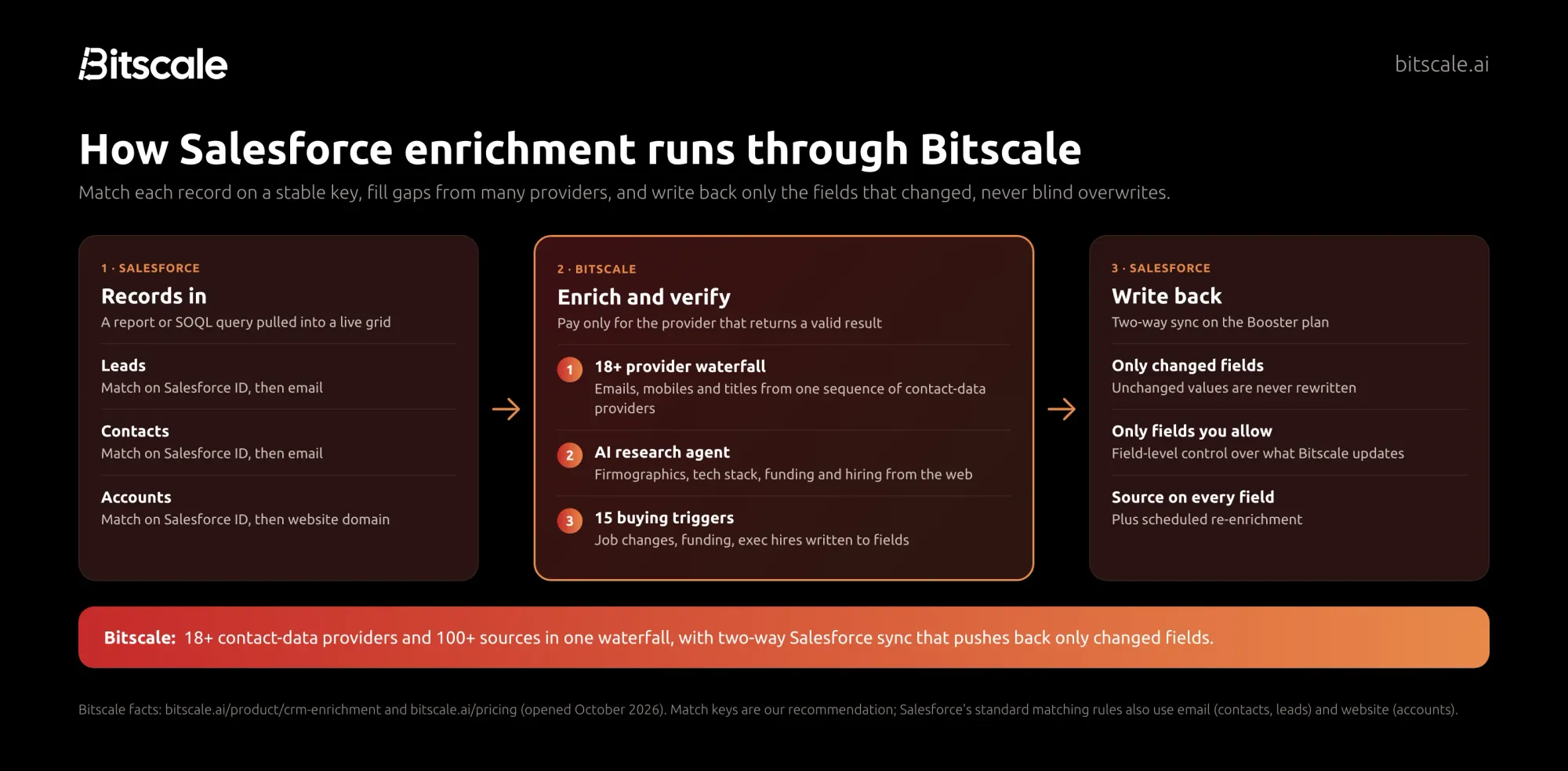
- Pull the records. Connect Salesforce on the Booster plan and pull a Salesforce report or a SOQL query straight into a live Bitscale grid. Start with one segment, such as Contacts on open opportunities.
- Measure the gaps. Check fill rates on your chosen fields before you enrich anything, so you can show what changed.
- Set the write rules. Choose which fields Bitscale may update, which stay human-owned, and which only fill when blank.
- Run the waterfall. Bitscale checks 18+ contact-data providers in sequence for emails and phones, and you pay only for the provider that returns a valid result.
- Add context. Bitscale's AI research agent scrapes company websites and runs Google and Perplexity research for firmographics, tech stack, funding and hiring data, and the 15 buying triggers land in fields.
- Verify, then write back. Review a sample, then sync. Only changed fields go back to Salesforce, each with its source.
- Schedule the refresh. Set re-enrichment by segment using the cadence above, and route job-change and bounce flags to the record owner.
If you'd rather not build this yourself, Bitscale GTM engineers set it up and migrate existing workflows for you. For the general version of this process outside Salesforce, see our customer data enrichment guide.
Common mistakes
- Matching on name. Names collide and vary. Match on Salesforce ID, then email or website domain.
- Letting a tool overwrite everything. Give it a field list, and write back only changed values.
- One provider for every region. A single database has gaps somewhere. A waterfall checks the next provider when the first comes back empty.
- Treating enrichment as a project. A one-time cleanup starts decaying the day it ends. Schedule it.
- No source on the field. If nobody can tell where a value came from, nobody will trust it.
- Enriching fields nobody uses. Every filled field is a field to maintain. Start with routing, scoring and outreach fields.
- Turning off duplicate rules "just for the import". That's how most duplicate clean-ups begin.
How Bitscale helps
This is the gap we built Bitscale to close: enrichment that lives inside Salesforce and keeps it current, instead of a file you import once.
- Two-way Salesforce sync on the Booster plan. Read and write to Salesforce directly, pull a report or SOQL query into a live grid, and push back only changed fields.
- Field-level control and source attribution. Choose exactly which fields Bitscale may update; every filled value shows where it came from.
- 18+ provider waterfall, 100+ sources. Bitscale reports 95% email and phone coverage with bounce rates below 0.5%.
- 15 buying triggers. Funding, exec hires, tech-stack changes and hiring posts, written to Account fields.
- AI research agent. Turns company websites and web research into structured fields.
- Done-for-you setup. Bitscale GTM engineers set up and migrate your workflows, with GTM engineer support on every paid plan and a dedicated engineer on Enterprise.
Here's what customers report. Phyllo keeps its CRM at 94% coverage with Bitscale. Shannon Jhanji, Growth Operations at Guidebook, says: "Our email and phone waterfall hits 92% coverage on European ICP. Nothing else we tested came close." And Kieran Krohn, Head of Growth at ScaleStation: "Bitscale made our CRM feel alive - and getting in touch with these guys is so easy!"
See the details on the CRM enrichment page.
| Plan | Price | Credits | Salesforce sync |
|---|---|---|---|
| Free | $0 | 200 | No |
| Growth | $349/mo ($314 annually) | 15K/mo | No (two-way HubSpot) |
| Booster | $799/mo ($719 annually) | 50K/mo | Yes, two-way |
| Enterprise | from $15K/yr | Custom CRM integration |
Pricing is per account, actions are unlimited on paid plans, and credits roll over up to 3x. Bitscale holds a G2 rating of 4.8/5. Full details are on the pricing page.
Frequently asked questions
What is Salesforce data enrichment?
Salesforce data enrichment is filling and refreshing missing or outdated fields on Leads, Contacts and Accounts, such as emails, phones, titles, firmographics and buying signals, using outside data sources, then writing the results back to Salesforce records.
Does Salesforce have built-in data enrichment?
Salesforce's Data 360 offers related list and copy field enrichments that bring data you already hold in Data 360 onto CRM records. It doesn't find new emails or phones. For that, teams add a third-party tool such as Bitscale.
How do I avoid duplicates when enriching Salesforce?
Match existing records on the Salesforce ID, new people on email and new companies on website domain. Keep Salesforce's standard duplicate rules active, and check that cross-object Lead and Contact matching is on if your org predates Summer '17.
Will enrichment overwrite data my reps entered?
It can, if the tool writes every field. Limit the fields it may update, enrich human-owned fields only when blank, and write back only changed values. Bitscale's two-way sync pushes back only changed fields you've allowed.
How often should I refresh Salesforce data?
My suggestion is weekly for records on open opportunities, monthly for target accounts, on create for new inbound Leads, and quarterly for the rest. Bitscale runs scheduled re-enrichment and flags job changes and bounced emails.
Which Bitscale plan includes Salesforce sync?
Two-way Salesforce sync is on the Booster plan, $799 a month or $719 a month billed annually, with 50K credits a month. Enterprise, from $15K a year, adds custom CRM integration. Growth includes two-way HubSpot sync.
Sources
Salesforce
- Enrichment Considerations, Salesforce Help (opened October 26, 2026)
- Create a Copy Field Enrichment, Salesforce Help (opened October 26, 2026)
- Standard Contact Matching Rule and Standard Lead Matching Rule, Salesforce Help (opened October 26, 2026)
- Standard Account Matching Rule, Salesforce Help (opened October 26, 2026)
- Standard Duplicate Rules, Salesforce Help (opened October 26, 2026)
Anthropic
Bitscale

Abhinay Kumar
CRO | Co-Founder Bitscale


Abhinay is the CRO and Co-Founder of Bitscale. He drives revenue strategy and go-to-market, helping B2B teams build scalable outbound motion using AI-powered enrichment and automation. Abhinay has a sharp focus on pipeline quality over volume, and his thinking on modern outbound has shaped how hundreds of sales teams approach prospecting. He writes about what actually works in GTM — no fluff, just signal.
Read other blogs
All Blogs
Apollo waterfall enrichment: how it works, what it costs, and when it's enough
How Apollo waterfall enrichment works: setup steps, how credits are charged, which plans include it, and when a dedicated multi-provider waterfall finds more.

How to find the decision-makers in a company: a 2026 playbook
A practical playbook to find the decision-makers in a company: map the buying committee, search LinkedIn and filings, verify people and get verified contacts.
What is technographic data? How B2B teams sell to the stack
What technographic data is, how B2B teams use tech-stack signals for targeting, displacement and timing, where it comes from, and 5 providers worth knowing.