Email Verification: A Practical Guide for Revenue Teams

Table of Contents
Every revenue team knows the moment: a tight outbound sequence goes out, and the results crater because a big chunk of the list bounces. Your sender reputation gets dinged. Your CRM starts to look like a museum of old contacts. And the forecast? It is only as credible as the data underneath it. Email verification stops that slow rot, but plenty of teams either skip it or treat it like a one-off spring cleaning instead of a habit.
This piece covers the fundamentals of email verification, where it fits (and where it does not) next to validation and email discovery, and how revenue teams can run it as part of a real workflow alongside enrichment, intent, and CRM sync. If you are supporting a small SDR pod or owning a full RevOps function, the goal is the same: keep bad addresses out, keep good records current, and make sure the results actually land back in the systems your team uses. Expect practical workflows, compliance guardrails, what to look for in software, and a few advanced moves for maintaining clean contact data at scale.
What Email Verification Actually Is (and What It Is Not)
Email verification checks whether a specific email address exists, is active, and can receive messages. A typical service will confirm the address is syntactically valid, verify the domain has working MX (mail exchange) records, and then attempt an SMTP handshake to see whether the mailbox appears to be real. The point is simple: sort deliverable addresses from invalid, risky, or disposable ones before you send anything.
What verification will not do is just as important. It will not promise primary-inbox placement, attention, or pipeline. It lowers bounce risk and helps protect sender reputation, but deliverability still depends on your content, sending infrastructure, authentication (SPF, DKIM, DMARC), and how recipients engage. If you want the longer version of that story, this breakdown of cold email deliverability in 2026 goes into the other variables.
Verification vs. Validation vs. Email Finder
These labels get tossed around like they are interchangeable. They are not, and mixing them up is how data quality workflows end up with blind spots.
| Process | What It Does | When to Use It | Example |
|---|---|---|---|
| Email Verification | Confirms a known address can receive mail by checking syntax, domain setup, and mailbox signals | Right before sending campaigns or before new contacts are allowed into your CRM | Checking whether [email protected] is a real, reachable mailbox |
| Email Validation | Enforces formatting and syntax rules (for example, correct @ usage and a plausible domain structure) without proving the mailbox exists | At the moment data is captured: web forms, imports, and manual entry | Blocking a typo like jsmith@@acme.com from getting saved |
| Email Finder / Discovery | Predicts a likely email address using name, company, and domain patterns | During prospecting when you have the person but not the email | Generating a work email for Jane Smith at Acme Corp |
| Understanding these distinctions prevents you from assuming one tool covers all three jobs. |
Why Revenue Teams Cannot Ignore Email Hygiene
B2B contact data does not sit still. People change jobs, companies merge, domains get retired, and inboxes go dormant. Industry research consistently shows that a significant portion of any B2B email database becomes outdated within a single year, with email addresses being among the fastest-decaying fields in a CRM. In practice, that means a meaningful slice of your list goes stale unless you actively maintain it.
The downside is measurable in real operational terms. Poor data quality drives up costs across the organization through bloated CRM counts, pipeline reporting that does not match reality, SDR hours burned on dead leads, and a sender reputation that gets punished for bounces. Research from Gartner, cited by IBM, has found that bad data carries a substantial annual cost for the average enterprise. For revenue teams, those costs show up as wasted effort and eroded trust in the systems people rely on daily. If you are comparing options, our roundup of the best data cleansing tools for RevOps maps the broader tool landscape.
How Email Verification Works: Methods and Purposes
Not all verifiers do the same work under the hood. The methods you should care about depend on list volume, where the data came from, and how much risk you are willing to tolerate. Here are the common checks you will see.
| Verification Method | Purpose | Limitation |
|---|---|---|
| Syntax Check | Confirms the address follows RFC-style formatting ([email protected]) | Great for typos; it cannot prove the mailbox exists |
| Domain / MX Record Check | Verifies the domain is live and configured to receive email | A working domain says nothing about a specific mailbox |
| SMTP Handshake (Ping) | Asks the mail server whether the mailbox exists without sending an email | Some servers (Gmail, Outlook) block or obscure results, leading to false positives |
| Catch-All Detection | Flags domains that accept all mail, even to nonexistent addresses | On catch-all domains, you cannot reliably confirm individual mailboxes |
| Disposable Email Detection | Identifies temporary inbox providers (e.g., Mailinator, Guerrilla Mail) | Disposable providers change frequently, so detection lists need constant updates |
| Role-Based Detection | Spots generic inboxes like info@, support@, sales@ | They can be deliverable, but they are usually weak targets for B2B outreach |
| A thorough email verification service combines multiple methods to classify each address. |
With a multi-step verifier, you typically get a status back: valid, invalid, risky, catch-all, or unknown. That middle territory is where teams get burned. A "risky" or "catch-all" result is not the same as "invalid," and collapsing them into one bucket leads to bad tradeoffs: you either delete too aggressively or you keep sending into addresses that are more likely to bounce. For B2B outbound, thresholds are usually tighter than for a newsletter, because even a small bounce spike on a cold-email domain can be enough to trigger filtering.
Manual Cleanup vs. Automated Verification
Manual scrubbing still happens: export a CSV, spot obvious typos, and wait for bounces to tell you what is broken. That is workable when you have a small contact list. Once you are dealing with thousands of records, it turns into a recurring fire drill, and it stays reactive by design.
| Factor | Manual Cleanup | Automated Verification |
|---|---|---|
| Speed | Hours to days depending on list size | Processes large lists in a fraction of the time |
| Accuracy | Easy to miss issues; no way to confirm mailbox existence by hand | Programmatic checks across syntax, domain, and SMTP layers |
| Scalability | Falls apart beyond a small contact list | Supports bulk email verification at very large volumes |
| Timing | Usually after-the-fact (you learn from bounces) | Runs before sending or on a set schedule |
| Cost | Time cost buried in SDR/ops hours | Subscription or per-verification pricing |
| Integration | Manual exports and re-imports to update the CRM | API or native CRM sync keeps records current automatically |
| Automated verification is not just faster; it catches issues that manual review simply cannot detect. |
Automation is not about removing judgment calls. It is about reserving human attention for the decisions that actually need context, like whether a catch-all address at a high-value account is worth attempting, or whether it should be routed for re-enrichment first.
Enrichment, Intent, and the Bigger Data Quality Picture
Verification answers one narrow question: will this address accept mail? It does not tell you whether you are emailing the right person, at the right company, at the right moment. That is where enrichment and intent do the heavy lifting.
Verification confirms the mailbox; contact and company enrichment supply the context: title, seniority, department, company size, industry, tech stack, funding stage. Without that layer, you end up with a list of deliverable addresses and a lot of guesswork, and SDRs burn time doing one-off research that your systems should have handled. This guide to CRM data quality lays out how verification and enrichment work together to keep records usable.
Intent signals add timing. If a verified contact sits at an enriched account that is actively researching your category, your outreach stops being a blind cold touch and starts looking like a relevant follow-up. Intent data can come from content consumption, job postings, technographic shifts, or funding events, and it helps teams rank which verified contacts to engage first instead of blasting the entire database.
Platforms like Bitscale bundle AI-assisted prospect research, enrichment, email discovery, verification workflows, buyer intent signals, and CRM synchronization into a single GTM workflow. AI capabilities in these platforms support tasks like analyzing available business data, recommending prioritization, and automating repetitive verification and enrichment steps, while human teams retain ownership of outreach strategy, compliance, and governance decisions. The operational win is fewer handoffs: verified data can move straight into the CRM and outbound sequences without living in spreadsheets or getting stuck between tools. When verification, enrichment, and intent sit in the same system, the time between "we found the account" and "we sent a relevant message" gets a lot shorter.
CRM Synchronization: Operationalizing Verified Data
Verification only matters if the results show up where the team actually works. A common failure mode looks like this: RevOps runs a bulk verification job, exports a clean file, and then the file dies in a shared drive while the CRM keeps serving stale records. A few weeks later, an SDR hits an invalid address because the cleaned data never made it back into the workflow.
To operationalize verification, you need automated CRM sync. A simple end-to-end loop looks like this:
- New contacts enter the CRM (via form fills, list imports, or enrichment tools).
- A verification workflow triggers automatically, checking each new email address.
- Valid contacts are tagged and routed to the appropriate sequence or owner.
- Invalid or risky contacts are flagged, quarantined, or removed based on rules you define.
- Scheduled re-verification runs on existing records at a cadence appropriate to your outbound volume and data volatility to catch decay.
Bitscale's CRM sync and workflow automation are built for that closed loop. Verified and enriched contacts land in your CRM with status tags, and outbound integrations can keep sequences pointed at deliverable addresses. The practical outcome is a CRM that stays aligned with reality instead of drifting into an outdated snapshot.
Compliance and Human Oversight
Verification tells you an address is deliverable, not that you are allowed to email it. That gap matters, and it is where teams often confuse technical readiness with legal permission.
Under the CAN-SPAM Act, each separate email in violation can carry significant financial penalties, with amounts adjusted periodically by the FTC. GDPR is stricter for EU contacts, requiring explicit consent or a documented legitimate interest basis for processing. A GDPR email marketing compliance guide breaks down what counts as consent and when legitimate interest applies.
No verification tool can do governance for you. Your team still needs working opt-out flows, fast unsubscribe handling, consent documentation, and a review process for outbound lists. Verification covers data quality; compliance sits above it as policy, training, and accountability. Human oversight remains essential for interpreting regulatory requirements, making judgment calls on edge cases, and ensuring that automated workflows operate within the boundaries your legal and compliance teams have set.
Legal note: Privacy, email marketing, and data protection regulations vary by jurisdiction and are subject to change. The information provided here is for general educational purposes and does not constitute legal advice. Organizations should consult qualified legal counsel regarding their specific compliance obligations before implementing email verification or outbound email programs.
Evaluating Email Verification Software
B2B email verification is a crowded category. Clay, Apollo.io, Lusha, Cognism, and Instantly.ai all offer some mix of verification and discovery, but the depth and workflow support varies. Some products are dedicated verifiers; others treat verification as one checkbox inside a broader sales intelligence suite. When you are evaluating email verification software, these criteria are what separate tools that actually improve operations from tools that only produce a report.
| Evaluation Criteria | What to Look For | Why It Matters |
|---|---|---|
| Verification Depth | Multi-layer checks (syntax, domain, SMTP, catch-all, disposable) | Single-layer checks miss bad addresses that still look correctly formatted |
| Bulk Processing | Bulk jobs that handle thousands to millions of records | Revenue teams need bulk email verification, not one-off lookups |
| CRM Integration | Native sync with Salesforce, HubSpot, or other CRMs | Without sync, verified data does not reach the systems your team uses every day |
| Enrichment + Discovery | Email finder, enrichment, and verification in one workflow | Cuts tool sprawl and reduces manual data transfers |
| Intent Data | Built-in buyer intent signals or integrations with intent providers | Helps prioritize verified contacts who are actively in-market |
| Compliance Features | Suppression list management, consent tracking, GDPR/CAN-SPAM support | Reduces regulatory risk and keeps opt-outs enforced |
| Pricing Model | Transparent per-verification, per-seat, or credit-based tiers | Unpredictable pricing makes ongoing hygiene hard to budget |
| Prioritize platforms that combine verification with enrichment and CRM sync to reduce operational complexity. |
Bitscale fits the "unified workflow" end of the spectrum. Instead of stitching together a verifier, an enrichment vendor, an intent provider, and a CRM connector, Bitscale consolidates AI-assisted prospect research, contact and company enrichment, email discovery, verification workflows, buyer intent signals, CRM synchronization, workflow automation, and revenue intelligence in one system. If you are also evaluating B2B email list providers, consolidation can lower both cost and the odds that data slips between tools and never makes it into the CRM.
Editorial note: Vendor capabilities, verification methods, integrations, pricing, AI functionality, and supported workflows evolve over time. The descriptions of specific tools and platforms in this piece reflect publicly available information as of the time of writing. Always verify current features, pricing, and integration support directly with each provider before making purchasing decisions.
Building a Verification Workflow That Scales
When email hygiene falls apart, it is rarely because a team picked the wrong verifier. More often, verification is not wired into a workflow that people actually follow. This framework is a solid starting point for a process that holds up as your database grows.
Start at the point of entry. Every new contact, whether it comes from a web form, a list import, an enrichment feed, or manual entry, should go through real-time email validation before it hits the CRM. Keeping bad data out is cheaper than cleaning it up later.
Schedule recurring verification. B2B contact data decays steadily as people change roles, companies restructure, and domains go offline. The right re-verification cadence depends on your outbound volume, the pace of change in your target market, and how quickly your CRM data tends to go stale. Teams with high-velocity outbound or fast-moving industries often benefit from more frequent runs, while organizations with longer sales cycles and more stable contact bases can space them out. Use your verification platform's API or scheduling so this happens automatically, not when someone remembers.
Define clear routing rules. Decide what "invalid" means operationally: delete, archive, or push to re-enrichment. Make the same call for catch-all and risky statuses. Write the rules down, then enforce them with CRM automation. Otherwise, verification results pile up as yet another field nobody trusts.
Close the loop with reporting. Track pass rates over time and break them down by source. If one list provider or enrichment feed regularly produces a high invalid rate, you have leverage to renegotiate or replace it. For the sending side of the equation, this resource on AI email marketing and deliverability tips covers how verification fits into healthier outbound sequences.
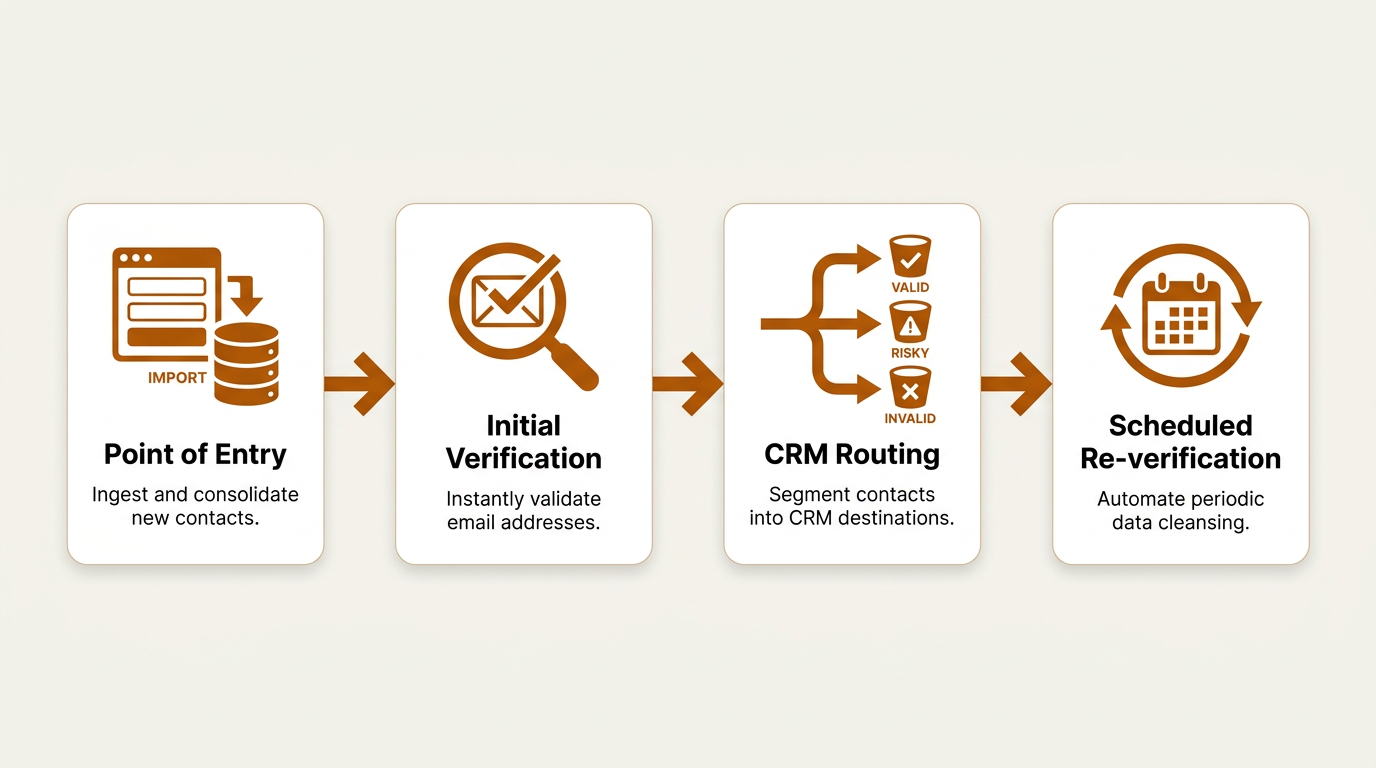
A scalable email verification workflow covers both new contacts and ongoing database maintenance.
Key Takeaways
Email verification is table stakes if your revenue motion depends on outbound email, CRM accuracy, or forecasting you can defend. It will not magically fix deliverability or conversion, but it does remove one of the most avoidable sources of failure: sending to addresses that cannot receive mail. Pair verification with enrichment so reps have context, add intent so you are not guessing on timing, sync everything back to the CRM so the work sticks, and keep compliance as a separate, explicit layer of governance with human oversight at every decision point.
Action items for your team:
- Audit your current contact database for invalid or outdated email addresses using a multi-method email verifier.
- Implement real-time validation at every data entry point (forms, imports, enrichment feeds).
- Schedule recurring bulk email verification runs at a cadence that reflects your outbound volume, sales cycle length, and the rate of change in your target market.
- Evaluate whether your current tooling covers verification, enrichment, intent, and CRM sync, or if consolidating onto a platform like Bitscale would reduce complexity.
- Review your compliance posture: consent records, suppression lists, opt-out handling, and alignment with applicable regulations in your operating jurisdictions.
Frequently Asked Questions
How often should revenue teams run email verification on their CRM database?
The right cadence depends on your outbound volume, the pace of change in your target industries, and how quickly your CRM data tends to go stale. Teams with high-velocity outbound or contacts in fast-moving sectors often benefit from more frequent runs, while organizations with longer sales cycles and more stable databases can space them out. The easiest way to make it stick is to automate it through your email verification service's scheduler or API.
Does email verification guarantee that my emails will reach the inbox?
No. Verification confirms a mailbox exists and can accept mail, which reduces bounces. Inbox placement still depends on sender reputation, authentication (SPF, DKIM, DMARC), content, sending volume, and recipient engagement. Industry data consistently shows that a notable share of emails land outside the primary inbox even when sent to verified addresses, so verification is necessary but not sufficient for strong deliverability.
What is the difference between email verification and email validation?
Validation checks formatting and syntax (for example, the presence of an @ symbol and a valid-looking domain). Verification goes further by checking signals that the mailbox exists on the mail server. Use validation to stop typos at entry; use verification before you send or sync contacts into downstream systems.
Can I use free email verification tools for B2B outbound at scale?
Free tools are fine for spot checks, but they usually fall short on bulk processing, API access, CRM integration, and catch-all detection, which are the features that matter for B2B outbound at scale. If you are managing thousands of contacts, dedicated email verification software with enrichment and CRM sync (such as Bitscale) is typically the more dependable setup.
How does email verification relate to GDPR and CAN-SPAM compliance?
Verification is about technical deliverability, not legal permission. GDPR requires explicit consent or documented legitimate interest for EU contacts. CAN-SPAM requires accurate sender info, a working opt-out mechanism, and prompt honoring of unsubscribe requests, with significant per-violation penalties enforced by the FTC. Treat verification and compliance as separate responsibilities that both need owners and process. Because regulations vary by jurisdiction and change over time, consult qualified legal counsel for guidance specific to your organization.

Sanket
CEO | Co-Founder Bitscale


Sanket is the CEO and Co-Founder of Bitscale. He leads company vision and strategy, building the future of AI-driven sales intelligence for modern B2B teams. Sanket is obsessed with the intersection of AI and go-to-market, and has spent years studying how the best B2B companies find, engage, and convert customers at scale. He writes about company building, product strategy, and where AI is taking the sales industry.
Read other blogs
All Blogs
Claude for sales: what actually works for reps and managers (2026)
How to use Claude for sales: 7 jobs it does well for reps and managers, example prompts, where it falls short, and how to connect your CRM and verified data.

Agentforce Coworker for sales: what your reps can really do with it
What is Agentforce Coworker? What reps can ask it, how it handles permissions, who gets it, and why your CRM data decides whether its answers are right.

Prompt-based prospecting: how to build a verified lead list with Claude or ChatGPT
Prompt-based prospecting, done right: describe your ICP to Claude or ChatGPT and let an MCP data layer build, verify and sync the list to your CRM.