Email Finder: A Buyer's Guide for Modern B2B Teams
Table of Contents
Explore Bitscale
Find decision makers, more insights and contact information about this company on Bitscale
An email finder isn't just a lookup box anymore. For RevOps teams running outbound at scale, it's the first step in a chain that ties prospect research to CRM enrichment, lead qualification, and pipeline intelligence. Pick the wrong vendor and you buy yourself bad data, compliance headaches, and reps burning cycles on dead ends. Pick the right one and your team finally has contact data they can trust.
B2B contact data decays steadily over time as people change roles, companies restructure, and domains go offline. Industry observers consistently report that a meaningful share of any email database goes stale within a single year, which means accuracy on day one is only part of the equation. The real question is whether the tool stays fresh, plugs into your CRM automation software, and reliably feeds downstream workflows without a mess of manual workarounds. The sections below lay out evaluation criteria, common pitfalls, governance requirements, and platform comparisons so you can buy with confidence.
What an Email Finder Actually Does (and Doesn't Do)
In practical terms, an email finder takes an input (a person's name, a company domain, a LinkedIn URL) and returns a work email it considers verified. Some vendors stop at the address. Others attach phone numbers, firmographic and technographic context, and even intent signals. That difference matters, because your email finder sets the quality ceiling for everything that follows: sequences, CRM records, and the reporting your leadership uses to make decisions.
What an email finder doesn't do by itself is guarantee deliverability, make you compliant, or rescue a weak outbound strategy. If a tool hands you a large list of addresses with a high bounce rate, your sender reputation takes a hit faster than if you sourced a smaller, more accurate set. For cold email outreach, most deliverability experts recommend keeping bounce rates as low as possible, with even modest increases above safe thresholds posing real risk to sender reputation. Use your own deliverability data and industry guidance to set the right quality bar when you compare vendors.
Core Capabilities to Evaluate in an Email Finder
Different teams need different shapes of tooling. A five-person SDR team doing targeted ABM doesn't shop the same way as a growth motion pushing tens of thousands of prospects a month. Still, a few capabilities consistently separate real systems from spreadsheet generators with a Chrome extension.
Accuracy and Verification
This is the metric that matters. Ask vendors exactly how verification works (SMTP ping, catch-all detection, mailbox-level validation) and whether it happens at lookup time or relies on cached results. Cached data ages quickly as underlying records decay month over month. Some platforms, like Apollo.io and Cognism, run large proprietary databases refreshed on their own schedules. Others, like Clay, pull from multiple data providers and let you waterfall between them to improve match rates. Bitscale pairs AI prospect research with real-time enrichment, pulling from multiple sources and verifying before it syncs into your CRM. Keep in mind that AI-driven verification analyzes available signals and identifies likely matches, but no system guarantees perfect accuracy across every domain and mailbox configuration.
Enrichment Depth
An email address without context doesn't help a rep write a credible first line. Look for vendors that return job title, seniority, department, company size, industry, funding stage, and technographic data alongside the email. That extra context is what turns a contact record into something you can actually qualify. The best AI CRM software pushes this enrichment straight into your CRM fields without the usual CSV shuffle. AI enrichment works by analyzing available business data from multiple sources and recommending the most relevant attributes for each record, though human review remains important for validating strategic fit.
CRM and Workflow Integration
If the contacts you find live in a separate tool and never land cleanly in your CRM, you've created a data silo on day one. Check for native CRM sync (Salesforce, HubSpot), API access, and integrations with outbound tools like Outreach, Salesloft, or Instantly.ai. CRM workflow automation should kick in the moment a new contact is found: create or update records, assign ownership, enroll in sequences, and catch duplicates before they multiply.
Traditional CRM vs. AI-Powered CRM: Where Email Finders Fit
Most teams still run their CRM like a filing cabinet. Reps log activities, managers pull reports, and everyone quietly assumes the data is wrong. An AI sales CRM changes the direction of the flow: instead of reps feeding the system, the system supports reps with enriched contacts, buying signals, and clearer opportunity prioritization. In that model, the email finder isn't a standalone tool; it's one input into a broader CRM intelligence layer. It's worth noting that AI capabilities vary significantly across platforms. Some use pattern matching and rules-based logic, while others incorporate machine learning models that improve recommendations over time. Evaluate each vendor's AI claims against your own testing rather than taking marketing language at face value.
| Capability | Traditional CRM | AI-Powered CRM |
|---|---|---|
| Contact data entry | Reps manually enter and update records | Contacts are auto-enriched from an email finder and third-party sources |
| Email verification | No verification, or occasional bulk checks | Real-time verification at the moment data enters the CRM |
| Lead qualification | Fixed scoring rules that rarely change | Dynamic scoring using firmographic, behavioral, and intent data |
| Pipeline visibility | Stages updated based on rep reporting | Deal health inferred from engagement patterns |
| Workflow automation | Simple triggers like field updates | Multi-step orchestration across enrichment, routing, and outreach |
| Data governance | Periodic cleanups and manual audits | Continuous deduplication, decay detection, and compliance flagging |
| Forecasting | Weighted pipeline math | Revenue intelligence models that incorporate buying signals and historical patterns |
| AI transforms CRM from a passive database into an active revenue platform. |
Vendor Landscape: Comparing Popular Email Finder Platforms
The category has settled into a few clear camps. Some vendors are pure-play email finders. Others treat email lookup as one feature inside a broader sales intelligence or outbound automation suite. Below is how the major players describe themselves, based on their public product pages and packaging.
| Vendor | Primary Positioning | Email Finder Approach | Notable Differentiator |
|---|---|---|---|
| Bitscale | Unified GTM platform for AI prospect research, enrichment, and pipeline intelligence | Work email and phone lookup combined with AI enrichment and CRM sync | Ready-made sales workflows, buying signal detection, and outbound tool integrations in one platform |
| Apollo.io | All-in-one sales intelligence and engagement platform | Large proprietary database with built-in sequencing | Broad database size with integrated engagement tools |
| Clay | Creative data enrichment and outbound orchestration | Waterfall enrichment across 75+ data providers | Flexible data manipulation with AI-powered research agent |
| Lusha | B2B contact and company data platform | Browser extension and API for direct dials and emails | Ease of use and quick Chrome extension lookups |
| Cognism | Premium EMEA and global B2B data provider | Phone-verified mobile numbers and compliant email data | Strong European data coverage and GDPR compliance focus |
| Vendor positioning based on each company's public website. Capabilities, pricing, integrations, AI functionality, data coverage, and verification methods evolve over time. Verify current details directly with each provider before making purchasing decisions. |
One warning before you get dazzled by big numbers: database size is a vanity metric. A massive contact database is worthless if a significant share of the emails bounce. Ask for a trial, run an accuracy check against a known-good list, and measure match rate and bounce rate specifically on your ICP segments.
Compliance and Governance: The Part Most Buyers Skip
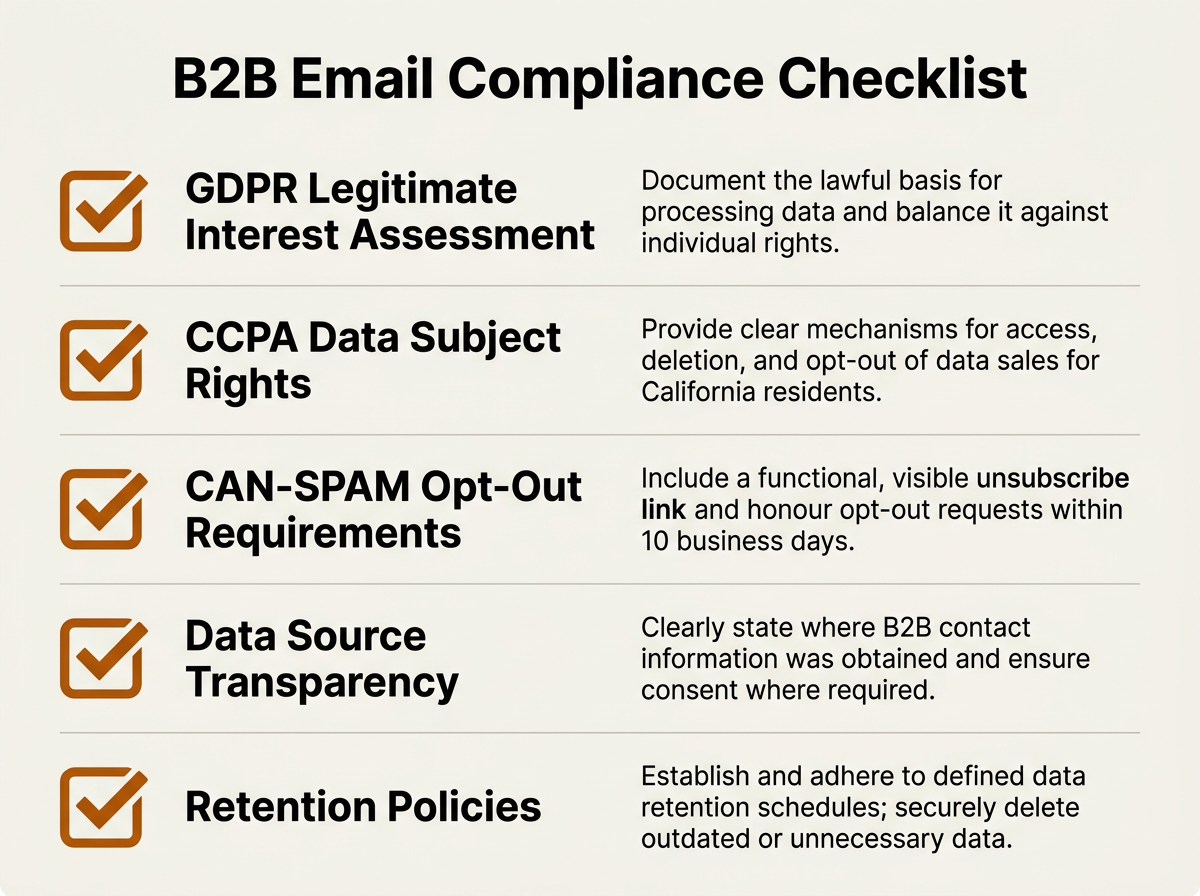
Compliance is not optional — build it into your email finder vendor evaluation from day one.
Under GDPR, B2B cold emailing is generally permissible under the "legitimate interest" legal basis, as long as the message is relevant, your data sources are transparent, and you provide a clear opt-out. The catch is accountability: if anyone asks, you own the proof, not your vendor. That means documenting your legitimate interest assessment and being able to explain where each contact's data came from.
CCPA has tightened the screws as well. The CCPA's B2B exemption has expired, which means California residents' business contact information (work email, job title) is now fully protected personal information under the law. If California is in your ICP, your vendor needs to support data subject access requests and deletion workflows. Put this question in writing: "Can you tell me the original source of each email address you return?" If the answer is vague or evasive, treat it as a red flag for compliance and for data quality.
Editorial note on legal compliance: Privacy and marketing regulations (including GDPR, CCPA, CAN-SPAM, and others) vary by jurisdiction and are subject to change. The information above is provided for general awareness only and does not constitute legal advice. Organizations should consult qualified legal counsel regarding their specific compliance obligations before deploying email finder tools or launching cold outreach programs.
Governance isn't just a legal checkbox. Maintaining CRM data quality takes real policies: deduplication rules, field standardization, and a plan for handling decay. Your email finder should reinforce those policies, not blow them up. Favor tools that check for existing CRM records before creating new ones, and that update stale fields instead of appending conflicting duplicates.
Building an Email Finder into Your Revenue Operations Stack
RevOps teams don't buy tools; they build systems. An email finder is just one node in a workflow that runs from prospect research through enrichment and qualification into outreach and pipeline management. The goal is to wire it together cleanly, without creating a brittle stack held together by one-off zaps and heroic manual effort.
Start with your ICP definition. Before anyone looks up a single email, codify your ideal customer profile in the CRM: industry, employee count, revenue range, tech stack, geography. Your email finder should be able to filter against those criteria so reps only receive contacts that actually match. This is where AI sales automation earns its keep: instead of reps babysitting lists, the system surfaces contacts that align with your ICP thresholds. Human teams remain responsible for defining those thresholds, reviewing the output, and refining criteria over time.
Connect enrichment to scoring. Once an email is found and the record is enriched, your automated CRM should score the lead on firmographic fit and, ideally, behavioral or intent signals. Platforms like Bitscale combine email lookup with buying signal detection, which helps answer not only who to contact but when outreach is most likely to land. For more on timing, see how to identify buying signals in B2B sales.
Automate the handoff to outreach. The space between "contact found" and "sequence enrolled" is where leads quietly disappear. CRM automation should route qualified contacts to the right rep, enroll them in the right sequence, and write every touchpoint back to the CRM record. If you're setting this up from scratch, the lead enrichment workflow guide breaks down the setup step by step.
Common Mistakes Teams Make When Buying an Email Finder
Certain failure modes show up again and again when teams roll out outbound tooling. They rarely appear in a polished vendor demo. They show up later, when bounce rates climb, duplicates spread, and your ops team gets stuck cleaning up the mess for a quarter.
- Optimizing for volume over accuracy. A tool that boasts a high match rate but delivers poor deliverability will damage your domain reputation. Cold email engagement has generally trended downward as inbox competition increases, which means you can't afford to waste impressions on bounced mail. Prioritize verified, deliverable contacts over raw list size.
- Ignoring catch-all domains. Plenty of enterprise domains accept all inbound email, even when the specific mailbox doesn't exist. If your email finder labels catch-all results as "verified," you're effectively guessing. Require clear documentation on how catch-all addresses are detected and reported.
- Treating the email finder as a standalone purchase. If it doesn't connect to your CRM, your sequencer, and your enrichment layer, you're paying for a spreadsheet generator. Evaluate it as part of your outbound sales automation stack, not as a point solution.
- Skipping the compliance review. If legal didn't sign off on your last vendor, that wasn't speed; it was risk. Pull legal or compliance into the process before you sign a contract.
- Not testing on your own data. Vendor benchmarks usually reflect their strongest segments. Run a blind test instead: take a representative sample of known-good contacts from your CRM, strip the emails, and see what the tool returns. Then compare match rate and accuracy against your ground truth.
AI vs. Human Responsibilities in Email-Driven Outbound
Every AI CRM discussion eventually hits the same anxiety: "Will this replace my SDRs?" No. What it will do is change where their time goes. Use the split below to keep responsibilities clear: let AI handle data processing and pattern recognition, and keep humans accountable for judgment, strategy, and relationships.
| Task | AI Responsibility | Human Responsibility |
|---|---|---|
| Finding email addresses | Automated lookup, verification, and enrichment based on available data signals | Defining ICP criteria, approving target lists, and validating results |
| Lead qualification | Scoring based on firmographic and intent signals | Final judgment on strategic fit and timing |
| Personalization | Generating first-draft messaging from enrichment data | Reviewing, editing, and adding genuine context |
| Pipeline forecasting | Analyzing deal velocity, engagement, and historical patterns | Interpreting forecast in context of relationships and market shifts |
| Data governance | Flagging duplicates, decay, and compliance issues | Setting policies, reviewing exceptions, and owning accountability |
| Relationship building | Surfacing relevant context and conversation history | Conducting calls, building trust, and negotiating |
| AI handles the data work. Humans own the relationships, strategy, and compliance decisions. |
Strong AI email marketing for B2B programs keep reps in the driver's seat on customer relationships, while AI takes on research, data entry, and first-pass qualification. The objective isn't headcount reduction. It's moving human effort back to the work that actually closes deals: outreach strategy, governance oversight, and relationship management.
Vendor Evaluation Criteria: A Practical Scorecard
When you're down to three or four vendors, stop trusting your gut and start scoring. Demo environments are designed to look clean; production data isn't. A simple scorecard forces the conversation onto the dimensions that drive long-term operational value.
- Data accuracy and freshness (highest weight): What is the real-world bounce rate on your ICP segments? How often is the database refreshed? Ask for transparency on refresh cadence and verification methodology.
- Enrichment breadth: Does the tool return firmographic, technographic, and seniority data alongside the email? Can it feed your best sales intelligence providers stack?
- CRM integration depth: Is there native sync with your CRM? Are updates bidirectional? Does it detect duplicates? How flexible is field mapping?
- Compliance infrastructure: Data source transparency, GDPR and CCPA support, deletion workflows, audit trails.
- Workflow automation: Can it trigger downstream actions (sequence enrollment, Slack alerts, task creation) without Zapier workarounds?
- Pricing model: Is it per-credit, per-seat, or usage-based? What happens to cost as team size and volume grow?
- Support and onboarding: Dedicated CSM? Implementation support? SLA on data quality issues?
Bitscale tends to score well against that framework because it rolls multiple point solutions (prospect research, email lookup, enrichment, CRM sync, buying signals, workflow automation) into one platform. That consolidation cuts integration overhead and gives RevOps teams a clearer system of record for prospect data. For teams tracking the broader state of RevOps, consolidation keeps coming up for a reason: fewer handoffs means fewer places for data to rot.
Editorial note: Vendor capabilities, pricing structures, integrations, AI functionality, data coverage, and verification methods evolve frequently. The comparisons and descriptions above reflect publicly available information at the time of writing. Always verify current details directly with each provider, request a trial on your own data, and confirm that features align with your specific requirements before making purchasing decisions.
Key Takeaways
Buying an email finder is really a data infrastructure decision. The right choice delivers accurate, enriched, compliant contact data into your CRM, your sequences, and your pipeline reporting. The wrong choice turns into a months-long cleanup project that drains your ops team and frustrates your reps.
- Test accuracy on your own ICP data before committing. Vendor benchmarks are not your benchmarks.
- Evaluate the email finder as part of your full revenue operations stack, not in isolation.
- Prioritize tools that offer real-time verification, enrichment, and native CRM sync.
- Build compliance into your evaluation from day one, especially for CCPA and GDPR, and consult qualified legal counsel for your specific obligations.
- Choose platforms that keep sales reps in control of relationships, strategy, and governance while AI automates data processing and enrichment.
Frequently Asked Questions
How accurate are modern email finder tools?
Accuracy varies widely by vendor, by data segment, and by how each platform handles verification. Generic benchmarks won't reflect your experience. The most reliable approach is a blind test using known-good contacts from your own CRM. Favor tools that perform real-time SMTP verification instead of relying solely on cached databases. Set your quality bar based on your own deliverability data, your outbound volume, and the risk tolerance of your domain reputation.
Is it legal to use an email finder for cold outreach?
In many jurisdictions, yes, but only if you meet the applicable legal requirements. Under GDPR, B2B cold emailing is generally permissible under legitimate interest when the message is relevant and includes a clear opt-out. In the US, the CCPA's B2B exemption has expired, so California residents' work emails are protected personal information. Privacy and marketing regulations vary by jurisdiction and change over time. Consult qualified legal counsel for your specific geography and use case.
What is the difference between an email finder and a sales intelligence platform?
An email finder is built to locate and verify email addresses. A sales intelligence platform (or AI sales CRM) adds layers: firmographic context, technographic signals, intent data, and pipeline analytics. Many modern platforms (including Bitscale, Apollo.io, and Cognism) bundle email lookup into a broader intelligence offering, which can reduce the number of point tools you need to maintain. AI capabilities vary across vendors, so evaluate each platform's claims through hands-on testing.
How often should I re-verify email addresses in my CRM?
The right re-verification cadence depends on your sales cycle length, outbound volume, the industries you target, and how quickly contacts in your segments tend to change roles. Teams targeting fast-moving sectors (such as early-stage tech companies) typically need more frequent verification than those selling into stable enterprise accounts. Rather than following a rigid schedule, look for tools that continuously flag stale records through automated CRM enrichment, so your team can address decay as it happens instead of relying on periodic bulk checks.
Can an email finder integrate with my existing CRM and outbound tools?
Most established platforms integrate with major CRMs (Salesforce, HubSpot) and outbound sequencers, but integration depth varies. Some vendors stop at CSV export; others support native bidirectional sync with duplicate detection and flexible field mapping. Bitscale, for example, pairs CRM sync with outbound tool integrations and ready-made sales workflows, which reduces the need for middleware like Zapier. Always confirm current integration capabilities directly with the vendor, as these evolve over time.

Sanket
CEO | Co-Founder Bitscale


Sanket is the CEO and Co-Founder of Bitscale. He leads company vision and strategy, building the future of AI-driven sales intelligence for modern B2B teams. Sanket is obsessed with the intersection of AI and go-to-market, and has spent years studying how the best B2B companies find, engage, and convert customers at scale. He writes about company building, product strategy, and where AI is taking the sales industry.
Read other blogs
All Blogs
12 Best CRM Sync Tools for Revenue Teams in 2026
Compare 12 CRM sync tools for Salesforce and HubSpot, including enrichment, reverse ETL, and automation options for cleaner revenue data.
Sales Data Enrichment: A Buyer's Guide for Modern B2B Teams
Sales data enrichment helps B2B teams improve CRM records, routing, prospecting, and account prioritization. Compare workflows, costs, and vendor fit today.
What Is AI Prospect Qualification? A Practical Guide for Modern Revenue Teams
AI prospect qualification helps revenue teams enrich data, assess ICP fit, prioritize buying signals, and route the right accounts into CRM workflows.