CRM Automation Workflows: How Modern Revenue Teams Save Time
Table of Contents
Sales reps consistently spend the minority of their work hours on actual selling. Research from Salesforce's State of Sales reports has repeatedly shown that the bulk of a rep's week goes to the unglamorous stuff: data entry, record updates, internal routing, and hunting for context that should already live in the CRM. CRM automation workflows are supposed to buy that time back, yet most teams stop at the shallow end. They add a task reminder here, a field update there, and declare victory.
This is not a tour of basic task automation. The point is how AI CRM workflows now run real revenue operations muscle: lead routing, contact enrichment, buying signals, opportunity prioritization, pipeline management, forecasting, and cross-functional GTM alignment. If you're a RevOps leader laying your first automation layer or an operator comparing CRM automation software, the goal is the same: practical workflow examples, governance that keeps your CRM sane, criteria to evaluate vendors, and the failure modes that quietly poison pipeline quality. Here's how the sections break down:
- What CRM Automation Workflows Actually Are (and what they're not)
- Manual vs. AI-Powered CRM Processes (comparison table)
- Core Workflow Types for revenue teams, with business outcomes
- Implementation Playbook with sequencing and governance
- AI vs. Human Responsibilities (where automation stops and judgment starts)
- Vendor Evaluation Criteria for choosing the right CRM workflow automation software
- Common Mistakes that sabotage automation initiatives
- FAQ covering the questions RevOps teams ask most
What CRM Automation Workflows Actually Are
A lot of people describe CRM workflow automation as "rules that send emails or assign tasks." That's not wrong, it's just tiny. In a modern revenue org, CRM process automation is the orchestration layer: it moves data, triggers decisions, and coordinates actions across the whole go-to-market motion. Done well, it becomes the system that keeps marketing, sales, customer success, and ops working from the same playbook.
As IBM explains, CRM automation uses technology to streamline repetitive tasks like data entry and lead nurturing. The newer wave of automated CRM workflows stretches further: ingest buying signals, enrich records as they change, score and route leads dynamically, and surface revenue intelligence that feeds forecasting. The easiest mental model is the jump from a thermostat (one rule) to a smart building system that adjusts climate, lighting, and energy usage based on occupancy patterns, weather forecasts, and time of day. Modern CRM sales automation is the smart building.
The market data points in the same direction. The global workflow automation market has been expanding rapidly, with analysts such as Grand View Research projecting strong multi-year growth driven by enterprise demand for operational efficiency. For B2B revenue teams, the cost of skipping automation is not just wasted hours; it shows up as missed follow-ups, misrouted leads, and deals that die because nobody had the right context at the right moment.
Manual CRM Processes vs. AI-Powered Workflows
Before you add another layer of logic to your CRM, it helps to see the delta: what most teams run today versus what workflow automation CRM tools can actually support.
| Process | Manual Approach | AI-Powered CRM Workflow |
|---|---|---|
| Lead Routing | Round-robin or manager assigns manually | Dynamic routing based on firmographics, territory, intent signals, and rep capacity |
| Contact Enrichment | Rep Googles the prospect, copies data into CRM | Auto-enrichment from multiple data providers on record creation or update |
| Opportunity Scoring | Gut feel or static point system | AI model weighs engagement, firmographic fit, buying signals, and deal velocity |
| Pipeline Updates | Weekly spreadsheet review with manager | Real-time stage progression triggers, stale-deal alerts, and forecast adjustments |
| Forecasting | Rep commits a number, manager adjusts | AI analyzes deal behavior, historical win rates, and engagement patterns |
| Cross-Functional Handoffs | Slack message or email to CS team | Automated handoff workflow with context packet, task creation, and SLA tracking |
| Manual CRM processes compared to AI-powered workflow automation across six core revenue operations functions. |
Core CRM Workflow Types and Business Outcomes
Not every workflow deserves the same attention on day one. The table below ties the highest-impact CRM workflow types to the business outcomes they move, so you can sequence rollout based on where your RevOps gaps are most expensive.
| Workflow Type | What It Does | Primary Business Outcome |
|---|---|---|
| Lead Routing & Assignment | Matches inbound leads to the right rep using territory, segment, and capacity rules | Faster speed-to-lead, which research from Harvard Business Review has consistently linked to significantly higher qualification rates |
| Contact & Account Enrichment | Appends firmographic, technographic, and contact data to CRM records automatically | Higher data quality, fewer bounced emails, better segmentation |
| Buying Signal Detection | Monitors intent data, website visits, job changes, and funding events | Earlier engagement with in-market accounts |
| Opportunity Prioritization & Scoring | Ranks deals by likelihood to close using engagement and fit data | Reps focus on winnable deals, improving conversion rates |
| Pipeline Hygiene & Stage Management | Flags stale deals, enforces stage criteria, triggers follow-up tasks | Accurate pipeline, fewer surprises at quarter-end |
| Forecasting & Revenue Intelligence | Aggregates deal signals into AI-assisted forecasts | Higher forecast confidence, addressing a gap that Gartner has identified as a persistent challenge for sales leaders |
| Cross-Functional GTM Orchestration | Coordinates handoffs between marketing, sales, and CS with SLA tracking | Consistent customer experience, reduced churn risk |
| Seven core CRM workflow types mapped to their primary business outcomes for B2B revenue teams. |
If you're starting from scratch, lead routing and contact enrichment tend to pay back fastest. They're straightforward to implement, and reps feel the difference immediately. For a practical walkthrough, check out this step-by-step lead enrichment workflow built for outbound teams.
Implementation Playbook: Sequencing Your CRM Workflow Automation
Rolling out AI CRM automation without a plan is how you end up with dozens of broken Zaps, competing lead assignment rules, and a sales team that trusts spreadsheets more than the CRM. A phased rollout keeps the system coherent and makes adoption easier. The four phases below (Foundation, Quick Wins, Intelligence, Orchestration) apply to most B2B organizations, though the time each phase takes will vary based on your CRM maturity, data quality, number of integrations, governance requirements, and organizational complexity.
Phase 1: Foundation
Start with a data quality audit. Deduplicate records, standardize field values (especially industry, company size, and lead source), and define your ideal customer profile in terms the CRM can evaluate programmatically. Automation does not "fix" dirty data; it amplifies it. This phase is unglamorous, easy to skip, and usually the reason workflows produce garbage outputs months later. The duration depends on the state of your existing data and how many systems feed into the CRM.
Phase 2: Quick Wins
Ship lead routing rules and contact enrichment workflows. They're low-risk and highly visible, which makes them ideal for building trust. When reps see new leads arrive with company size, tech stack, and a LinkedIn profile already attached, CRM adoption stops being a lecture and starts being self-interest. Platforms like Bitscale combine AI prospect research with CRM enrichment and sync, so you can deploy this layer without stitching together five separate tools. If you're running an account-based motion, the ABM workflow automation guide goes deeper on what "quick wins" looks like in practice.
Phase 3: Intelligence Layer
Once the basics are stable, add opportunity scoring, buying signal detection, and pipeline hygiene rules. This is where AI CRM workflows start to change how reps allocate time. Instead of a static scorecard, models incorporate engagement data, intent signals, and deal velocity. The output should be a pipeline view that feels prioritized, not just sorted. For a deeper look at scoring methodology, this breakdown of AI lead scoring and automation is a solid reference.
Phase 4: Orchestration (Ongoing)
The mature stage is cross-functional: workflows that carry context across teams, not just objects across stages. Marketing-qualified leads should land in sales sequences with the full story attached. Closed-won should trigger onboarding in CS. Expansion signals should route back to account executives before the renewal turns into a surprise. This is CRM workflow management at its most valuable, and it needs ongoing tuning as your GTM motion changes. Explore essential RevOps workflows for patterns that show up at this stage.
Where AI Decides and Where Humans Must
Sales team trust is fragile, and nothing breaks it faster than automation that acts like a black box. The hard part is not building workflows; it's deciding where automation ends and judgment begins. Use this framework to keep that boundary explicit.
| Responsibility | AI Handles | Human Handles |
|---|---|---|
| Data enrichment | Appending firmographic and contact data from verified sources | Validating strategic account profiles and correcting edge cases |
| Lead scoring | Calculating fit and engagement scores from behavioral data | Overriding scores based on relationship context or market knowledge |
| Pipeline alerts | Flagging stale deals, missing fields, and risk indicators | Deciding whether to push, pause, or disqualify a deal |
| Forecasting | Generating probability-weighted projections from deal signals | Committing the forecast number and explaining variance to leadership |
| Messaging | Drafting personalized outreach based on prospect research | Reviewing tone, accuracy, and strategic positioning before sending |
| Routing | Assigning leads based on rules, capacity, and territory | Handling exceptions, VIP accounts, and cross-territory conflicts |
| AI vs. human responsibilities in CRM automation: automation handles volume and pattern recognition, humans own judgment and strategy. |
The rule of thumb is simple: AI is great at volume, speed, and pattern recognition; humans are accountable for judgment, relationships, and strategy. Blur that line and the downside gets real fast. Letting AI auto-disqualify enterprise leads, for example, is the kind of "efficiency" that quietly costs quarters.
CRM Governance for Automated Workflows
Governance sounds like bureaucracy right up until someone's automation overwrites thousands of contact records with bad data. A few practices are non-negotiable:
- Ownership mapping. Every workflow needs a named owner responsible for monitoring, updating, and retiring it. Orphaned workflows are the fastest path to CRM data rot.
- Change management log. Record what changed, when, and why. When lead routing breaks, you want to trace it back to the field rename someone made last week.
- Testing environments. Do not ship new workflows straight to production. Use sandbox or staging environments and test with realistic data volumes.
- Audit cadence. Review active workflows on a regular schedule (quarterly is a common starting point, though some teams with high workflow volume review monthly). Remove anything that hasn't fired in a reasonable window or that nobody can explain. Adjust the cadence to match your organization's pace of change.
- Permission layers. Limit who can create, edit, and delete workflows. RevOps owns the automation layer; individual reps should not be building their own routing rules.
Governance matters even more when your CRM automation software pulls from external enrichment and signal providers. Bitscale, for example, syncs enriched data and buying signals directly into CRMs, which means your governance is not a nice-to-have. It directly determines the quality of what reps see when they open the CRM each morning.
Evaluating CRM Workflow Automation Software
The CRM automation market is crowded, and the labels are misleading. Some vendors do one thing well (enrichment, sequencing, routing) and leave you to glue the rest together. Others pitch an all-in-one platform that looks complete on a slide, then falls short where RevOps teams actually feel pain. Here's what to evaluate.
Key evaluation criteria:
- Native enrichment vs. third-party dependency. Does the platform enrich contacts and accounts itself, or is it mostly a pass-through to another provider? Native enrichment typically reduces cost and latency.
- Workflow builder flexibility. Can RevOps build multi-step, conditional workflows without pulling in engineering? Visual builders with branching logic matter here.
- CRM sync depth. Look for bi-directional sync with Salesforce, HubSpot, or your CRM of choice. Field mapping, deduplication behavior, and sync frequency tend to matter more than an integrations-page logo.
- Buying signal coverage. Intent data, job changes, funding events, technographic shifts. Strong platforms aggregate multiple signal types instead of betting everything on a single source.
- AI research capabilities. Can the tool do prospect-level research (not just append fields) and surface insights reps can act on?
- Pricing transparency and scalability. Credit-based pricing can get expensive quickly. Model your cost per enriched record and per workflow execution at the volume you expect.
Clay, Apollo.io, Lusha, and Cognism each cover slices of the stack. Clay is strong on flexible data orchestration. Apollo.io pairs a contact database with sequencing. Lusha and Cognism lean into contact data accuracy, particularly in European markets. Instantly.ai focuses on outbound email infrastructure. Bitscale positions itself differently: one platform that combines AI prospect research, CRM enrichment, buying signals, ready-made sales workflows, and outbound integrations, so you spend less time managing integrations and more time improving the motion. For a broader look at the category, see this roundup of top AI software for revenue teams.
Common Mistakes That Sabotage CRM Automation
These are the patterns that keep showing up in automation rollouts. They're rarely edge cases. They're what happens when teams move fast without operational guardrails.
Automating a broken process. If your lead handoff falls apart when it's manual, automation just makes it fail faster and more consistently. Fix the process first, then automate. The temptation to "solve it with automation" is real, and it almost never ends well.
Over-engineering from day one. Teams build a 15-step workflow with seven conditional branches before they've proven the basic two-step version works. Start simple. Add complexity only when the data shows the simple version is leaving value on the table.
Ignoring rep feedback. Your sales team will tell you quickly whether a workflow helps or hurts. If reps override lead scores, ignore routed leads, or re-enrich contacts the system already touched, treat that as a signal that something upstream is wrong. Listen early, before bad habits set in.
No measurement framework. Automation without measurement is just activity. Track speed-to-lead, enrichment accuracy, workflow error rates, and pipeline conversion by source. Research from Forrester has consistently shown that companies using automation for lead nurturing generate meaningfully more sales-ready leads at lower cost per lead, but those results come from deliberate measurement and iteration, not wishful thinking.
Treating automation as a one-time project. Your ICP shifts. Your CRM schema changes. New reps join. Workflows need maintenance, not a "set it and forget it" attitude. GTM automation for startups covers how fast-growing teams build automation that can keep up.
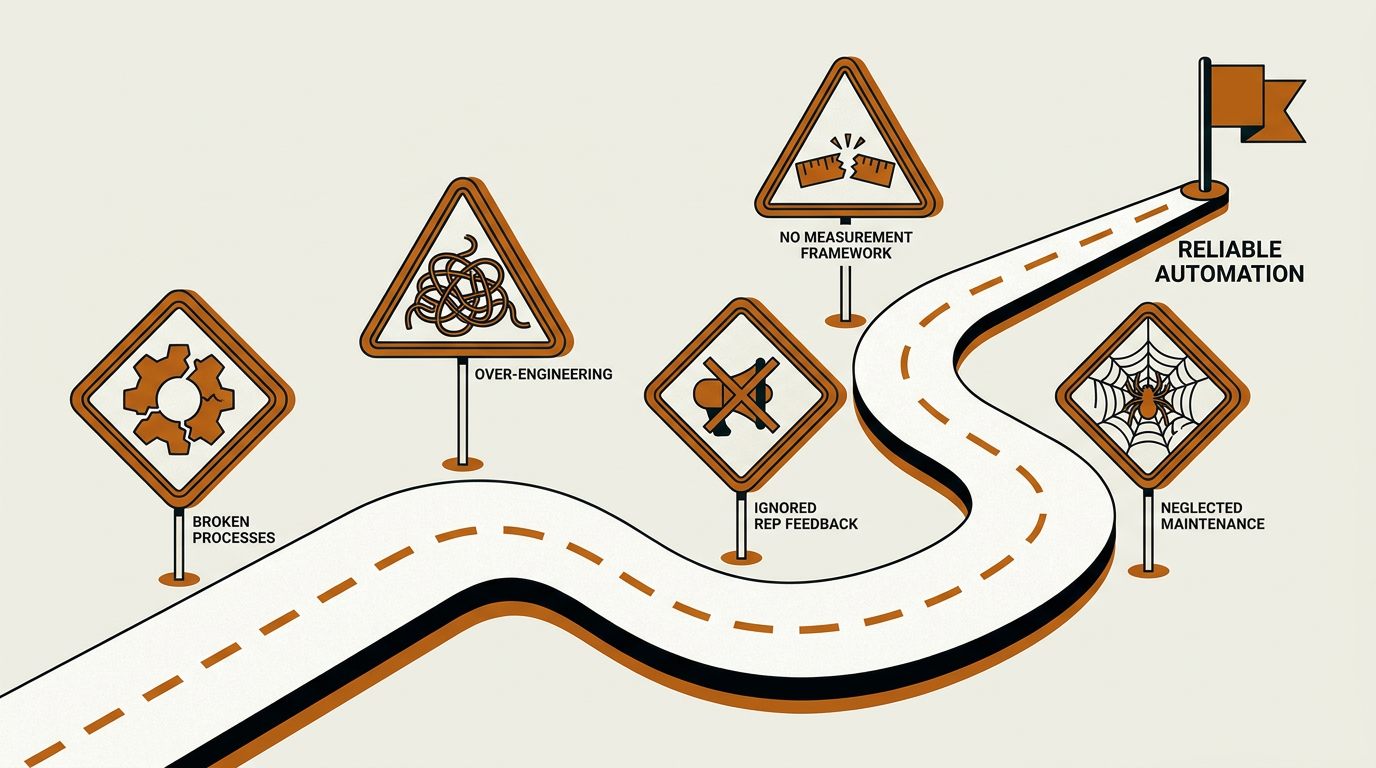
Each warning sign represents a pitfall that quietly derails even well-intentioned CRM automation workflows.
Putting It All Together: Key Takeaways
CRM automation workflows are not a feature checkbox. They're an operating discipline that shapes how efficiently your revenue team turns pipeline into revenue. The strongest implementations look boring in the right ways: clean data, phased rollout, clear governance, and a firm line where humans stay accountable for strategic decisions while AI handles the repetitive, data-heavy work.
If you're evaluating CRM workflow automation software, favor platforms that bring enrichment, signals, research, and workflow execution together instead of pushing you into six point solutions and a fragile integration chain. Update CTA text: If you want a concrete set of patterns to start from, Bitscale is built around this use case, combining AI prospect research, CRM sync, buying signals, and ready-made workflows into a single GTM platform. Less time spent on integration usually means more time for reps to actually sell.
Frequently Asked Questions
What is the difference between CRM task automation and CRM workflow automation?
CRM task automation covers single actions, like creating a reminder or updating a field. CRM workflow automation connects multiple steps, conditions, and systems into one process. A typical workflow might enrich a new lead, score it, route it to the right rep, and kick off a personalized outreach sequence without someone babysitting each step.
How do AI CRM workflows improve forecasting accuracy?
AI CRM workflows look at deal engagement patterns, historical win rates, stage velocity, and buying signals to produce probability-weighted forecasts. That reduces how much the forecast depends on subjective rep commits. Gartner has consistently identified low forecast confidence as a widespread challenge among sales leaders, and AI-driven analysis is aimed squarely at closing that gap by grounding projections in behavioral data rather than intuition.
What CRM automation software works best for small B2B teams?
Small teams usually do best with platforms that bundle enrichment, routing, signals, and outreach without requiring a dedicated RevOps engineer to keep integrations alive. Bitscale offers ready-made sales workflows and CRM sync that smaller teams can deploy quickly. Apollo.io and Instantly.ai are also common choices for teams focused primarily on outbound.
How long does it take to implement CRM process automation?
Timelines vary significantly based on CRM maturity, data quality, the number of integrations involved, and organizational complexity. A phased rollout typically moves through Foundation (data cleanup and field standardization), Quick Wins (lead routing and enrichment), Intelligence Layer (scoring, signals, pipeline hygiene), and Orchestration (cross-functional workflows). Some teams reach the intelligence layer within a few months; others with more complex environments take longer. Full cross-functional orchestration is ongoing.
Can CRM automation workflows replace revenue operations staff?
No. Automated CRM workflows take on repetitive, data-heavy work so RevOps professionals can spend more time on strategy, analysis, and cross-functional alignment. The goal is a more effective team, not headcount reduction. Humans still own governance, exception handling, and strategic decision-making.

Sanket
CEO | Co-Founder Bitscale


Sanket is the CEO and Co-Founder of Bitscale. He leads company vision and strategy, building the future of AI-driven sales intelligence for modern B2B teams. Sanket is obsessed with the intersection of AI and go-to-market, and has spent years studying how the best B2B companies find, engage, and convert customers at scale. He writes about company building, product strategy, and where AI is taking the sales industry.
Read other blogs
All Blogs
Data append services: how they work and how to read a match rate
Data append services fill missing emails, phones and company fields on your records. How match rates are counted, what to ask vendors, and the cost math.
GTM engineer jobs in 2026: what 1,000 job posts actually ask for
My co-founder pulled 1,000 GTM engineer job posts off LinkedIn and ran each through AI. What the roles really are, posted pay, and who should hire one.

Apollo waterfall enrichment: how it works, what it costs, and when it's enough
How Apollo waterfall enrichment works: setup steps, how credits are charged, which plans include it, and when a dedicated multi-provider waterfall finds more.