Clay vs Claude for GTM: what each does, and the better setup (2026)
Table of Contents
Explore Bitscale
Find decision makers, more insights and contact information about this company on Bitscale
The short answer: "Clay vs Claude" compares two tools that do different jobs. Claude is Anthropic's AI assistant: it researches, writes and takes actions in other tools through connectors, but it has no contact database of its own. Clay is a spreadsheet-style enrichment and workflow tool that buys data from 150+ providers. Most GTM teams need both jobs done, a model that reasons and a data source that returns verified contacts. Bitscale covers the data job in its own grid and inside Claude through its MCP server, with one email and phone waterfall across 18+ providers and two-way HubSpot and Salesforce sync.
- Use Claude alone for account research, drafting, call prep and ad-hoc questions.
- Add a data tool when you need verified emails and phones at volume, or enriched records written back to your CRM.
- Use both together by connecting a data tool to Claude, so reps ask in plain language and the data comes from a verified source.
Clay vs Claude at a glance
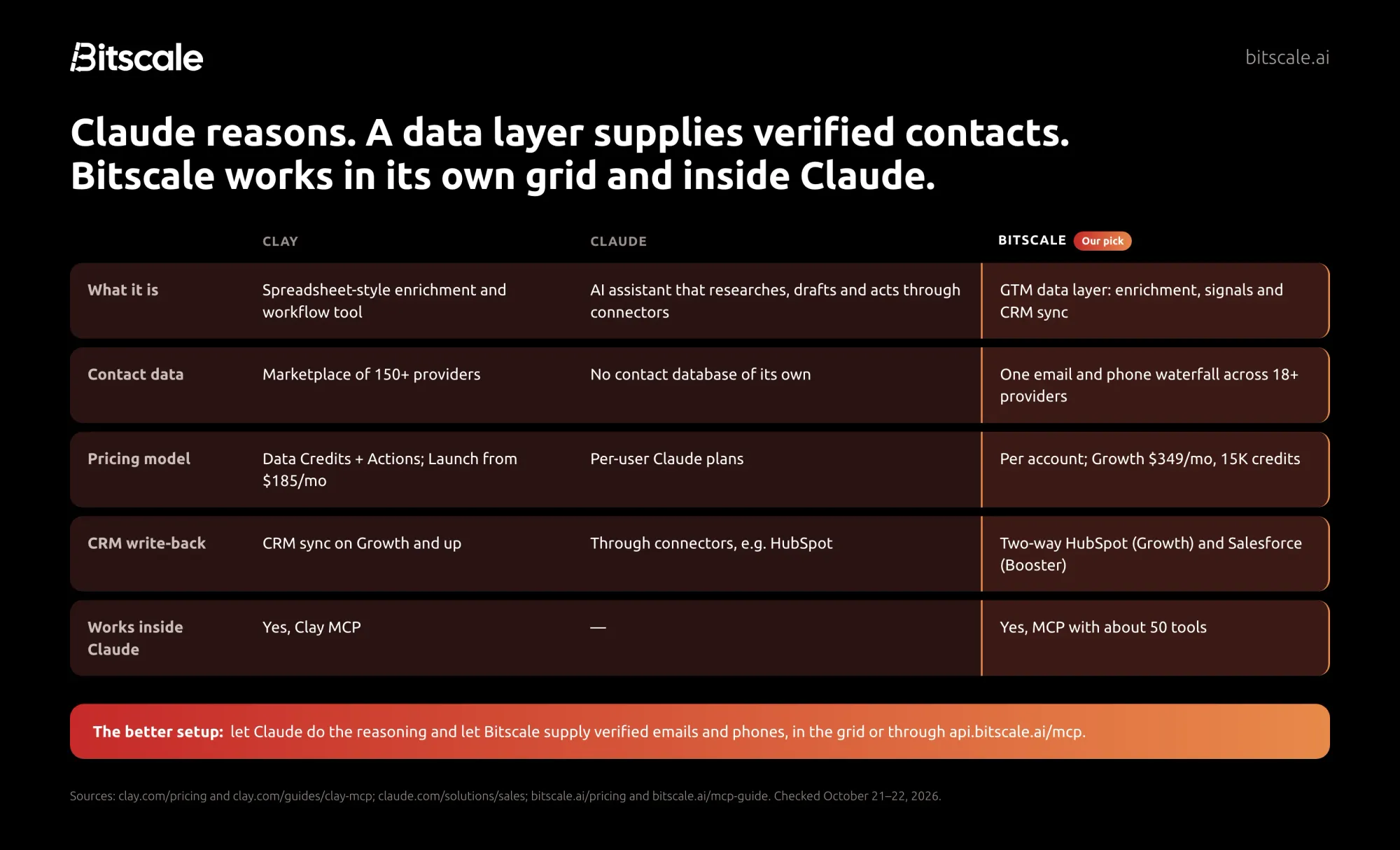
| Clay | Claude | Bitscale | |
|---|---|---|---|
| Job | Build tables, enrich them, run workflows | Research, write, reason, act through connectors | Find, enrich and verify contacts, track signals, sync the CRM |
| Data source | Marketplace of 150+ data providers | None of its own; reads the web and the tools you connect | One email and phone waterfall across 18+ providers, 100+ data sources overall |
| Pricing model | Data Credits plus Actions; Launch from $185/mo, Growth from $495/mo | Claude plans per user: Free, Pro, Max, Team, Enterprise | Per account; Free 200 credits, Growth $349/mo ($314 annually) for 15K credits |
| CRM write-back | CRM sync on Growth and Enterprise | Through connectors to tools such as HubSpot and Salesforce | Two-way HubSpot (Growth) and Salesforce (Booster), only changed fields |
| Works inside Claude | Yes, through Clay MCP | n/a | Yes, through the Bitscale MCP server |
| Suits | GTM engineers who build custom tables and workflows | Every rep and manager, for research and writing | RevOps and GTM teams that want verified data in the CRM and in Claude |
| Limits | Two meters to plan for; Clay suggests MCP for 1 to 20 contacts | Can state wrong facts; no verified contact data | A data layer, not a writing assistant; pair it with Claude |
Clay and Claude facts from their own pages, checked October 22, 2026. Bitscale prices from bitscale.ai/pricing, checked October 21, 2026.
If you're new to the role that usually runs this stack, start with our guide to what GTM engineering is.
What Claude is, and what it isn't, for GTM
Claude is an AI assistant from Anthropic. On its Claude for sales page, Anthropic describes reps asking Claude to research an account "across the web, filings, news, and your CRM," preparing calls and drafting follow-ups. The same page says Claude connects to tools including Salesforce, HubSpot, Gong and Clay, and that developers can connect Claude to CRM and engagement workflows through MCP (the Model Context Protocol).
Connectors are how Claude reaches your tools. Anthropic's help center says custom connectors, which use remote MCP servers, are available on Free, Pro, Max, Team and Enterprise plans, with Free limited to one custom connector. On Team and Enterprise, an owner adds the connector and each user then connects their own account. Claude Code, Anthropic's agentic coding tool, also connects to external data through MCP; we cover what sales teams can learn from it in Claude Code for B2B sales.
What Claude is not: a contact database. It doesn't hold a store of verified work emails or mobile numbers. When it answers a question about a person, it either uses the tools and documents you give it or it reasons from what it already knows, which is where errors come in.
Where Claude is strong for GTM:
- Account research before a call, from public pages and your CRM.
- Drafting first-touch emails, follow-ups, call summaries and proposals.
- Answering ad-hoc questions about a territory or a deal.
- Running tools you connect to it, including a data tool like Bitscale.
What Clay is
Clay is a spreadsheet-style tool for building lists and enriching them with data from many providers. Its pricing page says you can "find and enrich data from 150+ providers," and its plans include Claygent, Clay's AI research agent, plus the option to call AI models, including Claude models, inside a table.
Clay changed its pricing on March 11, 2026. In its announcement, Clay split the old credit into two meters and said marketplace data costs would fall 50–90%:
- Data Credits pay for data bought from Clay's marketplace.
- Actions measure platform work, such as running an enrichment, calling an AI model or sending data to another tool.
The current plans, from Clay's pricing page:
- Free: 500 Actions and 100 Data Credits a month.
- Launch: from $185 a month ($167 billed annually), starting at 15,000 Actions a month.
- Growth: from $495 a month ($446 annually), with 40,000 Actions and 6,000 Data Credits a month. CRM sync starts on this plan.
- Enterprise: custom pricing.
Actions reset each billing cycle; unused Data Credits on Launch and Growth can roll over up to 2x the monthly amount. Clay has a G2 rating of 4.6/5. For the full breakdown, see Clay's own pricing page. If you're weighing Clay against Bitscale directly, read our Bitscale vs Clay comparison.
Clay or Claude for enrichment?
For enrichment, meaning filling in verified emails, phone numbers, titles and firmographics on records, Claude on its own is the wrong tool and Clay or another data tool is the right one. For everything around enrichment, Claude is often the better fit. The question is which job you're doing.
When Claude alone is enough
- Researching a handful of accounts. Claude can read company pages, news and filings and summarize what matters before a call.
- Writing. Openers, follow-ups, objection handling and proposal drafts are what an assistant does well.
- Questions about data you already have. Connected to your CRM, Claude can answer "which open deals in my territory have no activity this month?" without a new tool.
- One-off thinking work. Building an ICP hypothesis, outlining a territory plan or reviewing a sequence.
None of these need a verified contact. If the output is words, Claude alone is usually enough.
When you need a data tool
- Verified emails and phones at scale. A sequence of hundreds of contacts needs addresses that were checked, not guessed. Bounces hurt the sending domain for every rep.
- CRM write-back. Enriched fields should land in HubSpot or Salesforce with a source, not in a chat window.
- Repeatable lists. A scheduled job that re-enriches records and flags job changes is a data workflow, not a conversation.
- Cost control. A data tool shows the credit cost per lookup before you run a batch.
If the output is a record in your CRM, you need a data tool, either on its own or connected to Claude. Bitscale is built for exactly this: waterfall enrichment across 18+ providers, verification, and a two-way sync that pushes back only the fields that changed.
The hidden cost of using Claude as a data source
It's tempting to ask Claude "what's the email for the VP of Sales at Acme?" and paste the answer into a sequence. The risk is that a plausible-looking address isn't a verified one.
Anthropic is direct about this in its guide to reducing hallucinations: even advanced models like Claude "can sometimes generate text that is factually incorrect." The guide recommends letting Claude say "I don't know," grounding answers in source documents and asking for citations, and notes that these techniques reduce hallucinations without eliminating them, so critical information should be validated.
For contact data, that means:
- Don't treat a model's guess as a verified email or phone. An address built from a name pattern can look right and still bounce.
- Ground the model in a real source. Give Claude a data tool through a connector, so the email comes from a provider lookup and verification, not from the model.
- Keep the provenance. You want to know which provider returned each field, so you can trust it and fix it.
The cost of skipping this doesn't show up in the Claude bill. It shows up later as bounced emails, wrong numbers and CRM records nobody trusts.
Claude and Clay integration: using both together
You don't have to choose. Clay offers Clay MCP, which its guide (published June 14, 2026) says brings Clay's data and workflows into ChatGPT, Claude and Codex. In Claude, you add the Clay connector from the Connectors page; on Claude Enterprise, an admin enables it first. Clay says new accounts get 500 free Clay credits on first connect.
Clay also draws a line on volume: its guide recommends MCP for rep-scale work of "1 to 20 contacts," and the Clay platform for 20+ contacts, complex automation and deep CRM syncs. That's a fair split, and it points to the general pattern: Claude is the interface where reps ask questions, and a data tool does the lookups.
We compare MCP servers for sales data, including Clay's and Bitscale's, in our guide to the best MCP servers for sales.
The better setup: a data layer that works in its grid and inside Claude
The most practical GTM setup in 2026 has two parts:
- Claude as the reasoning and writing layer. Reps research, plan and draft there.
- A data layer that works in two places. A grid for bulk work and scheduled jobs, plus an MCP server so Claude can call the same enrichment on request.
Bitscale fits the second part. It runs in its own grid, where you pull a HubSpot list or Salesforce report, enrich it through one waterfall across 18+ contact-data providers, and push back only the fields that changed. The same workspace is available inside Claude through the Bitscale MCP server at https://api.bitscale.ai/mcp, which you connect with OAuth. Bitscale's MCP guide says it works with Claude, ChatGPT, Gemini CLI, Cursor, Claude Code and any client that supports remote MCP.
As an illustration only, here is how a rep might use it:
- In Claude, the rep asks: "Take my HubSpot list of target accounts, find the head of sales at each, and get verified emails and mobiles."
- Claude calls Bitscale through MCP. Bitscale shows a credit estimate before running the column, then runs the waterfall and verifies the results.
- Claude reads the enriched rows and drafts a first-touch email for each contact, referencing recent company news.
- The enriched fields sync back to HubSpot from the Bitscale grid, so the CRM, not the chat, holds the data.
Each tool does the job it's built for. Claude writes and reasons; Bitscale supplies the contacts and keeps the CRM current.
How Bitscale helps
Bitscale is the GTM data layer for your CRM, and it's designed to work alongside Claude rather than replace it:
- Verified contact data. One email and phone waterfall across 18+ contact-data providers, with 150+ data sources overall. Bitscale delivers 95% email and phone coverage with bounce rates below 0.5%.
- Credits only for results. Waterfalls charge only for the provider that returns a valid result.
- MCP inside Claude. The Bitscale MCP server exposes about 50 tools, with OAuth sign-in, a credit estimate before running a column or grid, and credits charged at the same rate as the app. Bitscale's MCP guide says a free account gets MCP access and 200 free credits.
- Two-way CRM sync. HubSpot from Growth, Salesforce from Booster, writing back only changed fields.
- Signals for timing. 15 buying triggers, such as funding, exec hires and tech-stack changes.
- An AI research agent for company, tech-stack, funding and hiring research, plus ready-made playbooks.
- Help to set it up. Done-for-you setup and migration by Bitscale GTM engineers, with GTM engineer support on every paid plan and a dedicated engineer on Enterprise.
- Simple pricing. Free with 200 credits; Growth $349 a month ($314 annually) for 15K credits; Booster $799 ($719 annually) for 50K credits; Enterprise from $15K a year. Pricing is per account, actions are unlimited on paid plans, and credits roll over up to 3x.
- G2: 4.8/5.
Choose Bitscale if you want Claude for research and writing, and a data layer that returns verified emails and phones, keeps HubSpot or Salesforce current, and works in its own grid and inside Claude.
Frequently asked questions
What is the difference between Clay and Claude?
Clay is a spreadsheet-style enrichment and workflow tool that buys contact and company data from 150+ providers. Claude is Anthropic's AI assistant for research, writing and acting through connectors. Clay supplies data; Claude reasons over it. Many teams use a data tool and Claude together.
Can Claude find verified email addresses?
Not on its own. Claude has no verified contact database, and Anthropic notes that models can generate factually incorrect text. Connect Claude to a data tool, such as Bitscale through MCP, so emails come from provider lookups and verification instead of the model.
Is Claude good for GTM?
Yes, for research, call prep, drafting and questions about your CRM data. Anthropic's sales page shows Claude connecting to tools such as HubSpot, Salesforce, Gong and Clay. For contact data and CRM enrichment, pair it with a data layer such as Bitscale.
Does Clay integrate with Claude?
Yes. Clay MCP works in Claude, ChatGPT and Codex, and you add it from Claude's Connectors page. Clay recommends MCP for 1 to 20 contacts and its own platform for larger lists, complex automation and deep CRM syncs.
Should I use Clay or Claude for enrichment?
Use a data tool for enrichment, because it returns verified emails and phones with a source and can write them to your CRM. Clay and Bitscale both do this. Use Claude for the research and writing around enrichment, or as the interface that calls the data tool.
How do I connect Bitscale to Claude?
Add the Bitscale MCP server at https://api.bitscale.ai/mcp as a custom connector in Claude and sign in with OAuth. Bitscale's MCP guide walks through the steps, and a free account includes MCP access and 200 credits.
Sources
Anthropic (accessed October 22, 2026)
- Claude for sales
- Get started with custom connectors using remote MCP
- Claude Code overview
- Reduce hallucinations
Clay (accessed October 22, 2026)
Bitscale
- Bitscale pricing (accessed October 21, 2026)
- Bitscale MCP guide (accessed October 22, 2026) and MCP reference (accessed October 7, 2026)
G2 product review pages for Clay and Bitscale, accessed October 7, 2026.

Abhinay Kumar
CRO | Co-Founder Bitscale


Abhinay is the CRO and Co-Founder of Bitscale. He drives revenue strategy and go-to-market, helping B2B teams build scalable outbound motion using AI-powered enrichment and automation. Abhinay has a sharp focus on pipeline quality over volume, and his thinking on modern outbound has shaped how hundreds of sales teams approach prospecting. He writes about what actually works in GTM — no fluff, just signal.
Read other blogs
All Blogs
Salesforce in Claude (Claudeforce): what sellers get, and what it means for your CRM data
Salesforce in Claude puts your live CRM inside Claude with 37 sales skills. What sellers get, who can use it, and how to get your CRM data ready first.

Forward deployed engineer vs. GTM engineer: what each role does and which one you need
Forward deployed engineer vs GTM engineer: what each role builds, who it works for, tools, KPIs and posted 2026 pay, plus which one your company needs.
RevOps architect: role and responsibilities, skills, salary and a 30/60/90-day plan
What a RevOps architect does, how the role differs from a RevOps manager, admin or GTM engineer, plus skills, a 30/60/90-day plan and sourced 2026 salaries.