Apollo waterfall enrichment: how it works, what it costs, and when it's enough
Table of Contents
Explore Bitscale
Find decision makers, more insights and contact information about this company on Bitscale
The short answer: Apollo waterfall enrichment checks Apollo's own data first, then moves through third-party email and phone sources your admin has connected, in the order you set, until it finds a validated result or runs out of sources. It is included on Apollo's Basic, Professional and Organization plans, and you spend credits each time a source returns data, verified or not. If you already live in Apollo and your lists are light, it is often enough. If you need more providers in the chain, want to pay only for valid results, or want clean write-back to HubSpot or Salesforce, a dedicated waterfall like Bitscale (18+ contact-data providers in one email and phone waterfall) usually finds more.
The mistake I see most often: a team switches on Apollo's waterfall and assumes it works like every other waterfall. It doesn't. Waterfalls differ in how many providers sit in the chain, what you pay for, and where the result lands. Here is Apollo's version, explained fairly, and my take on when to add something more.
What is Apollo waterfall enrichment?
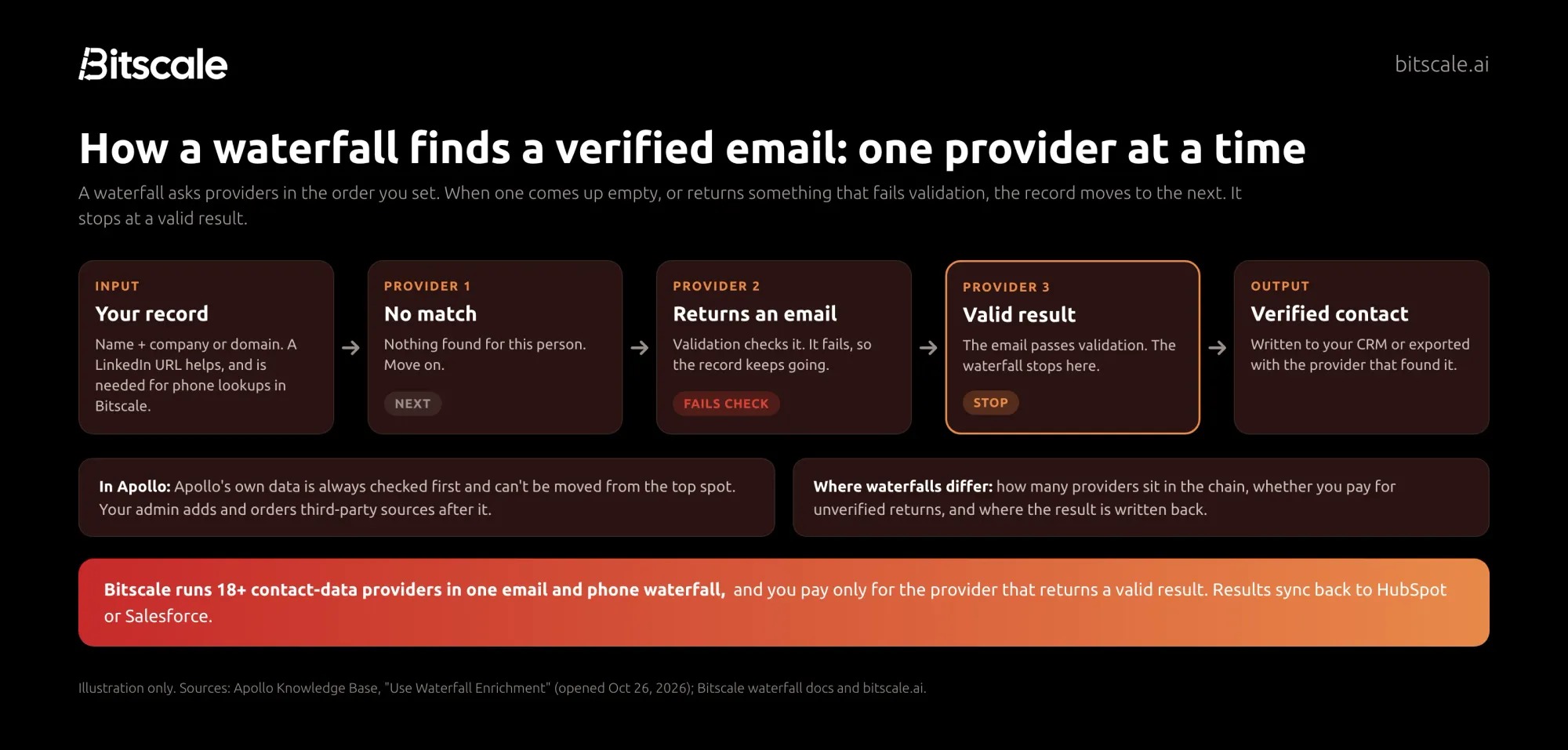
Apollo waterfall enrichment is Apollo's built-in way to find emails and phone numbers that Apollo's own database doesn't have. In Apollo's words, "When Apollo doesn't have the email or phone number you need, waterfall enrichment automatically checks your connected third-party data sources, in the order you define, until it finds a match."
If you want the general concept first, our waterfall enrichment guide covers it. The Apollo-specific details are what matter here:
- Data types: emails and phone numbers. Apollo's product page says waterfall "currently covers enrichment for emails and phone numbers."
- Order: Apollo is always the first source and "can't be moved from the top spot." Third-party sources follow in the order your admin sets.
- Sources: Apollo says you can choose from "20+ partners in Apollo or bring your own data vendor." Apollo's pages point to its Integrations Marketplace for the full list rather than naming providers.
- Default behavior: it "runs by default for your entire team based on global settings configured by an Apollo admin."
- Where it runs: People search, CSV imports, the Chrome extension, enrichment workflows, the Data Health Center, sequences and the Apollo API.
- CRM sync: if HubSpot, Salesforce or Pipedrive is connected, "primary emails and phone numbers sync automatically after waterfall enrichment," and existing CRM data is kept as a secondary email or phone.
One point that confuses buyers: Apollo says waterfall enrichment is not the same as its CRM enrichment. Waterfall fills emails and phones. CRM enrichment is a separate process that adds Apollo's firmographic, demographic and technographic data to existing Salesforce or HubSpot records, and the two charge credits differently.
How to set up waterfall enrichment in Apollo
An Apollo admin configures the team's global lineup. Based on Apollo's "Use Waterfall Enrichment" article, the steps are:
- Open the settings. Go to Settings > Waterfall enrichment, or click Configure Waterfall settings at the top of the email or phone column in People search.
- Add sources. Click Add source and pick providers. There are two kinds:
- Apollo-integrated sources charge Apollo credits, and you don't need your own account or API key with the provider.
- External sources via API key use your existing subscription with that provider. Apollo says they "set their own credit charges and don't consume Apollo credits."
- Order the lineup. Drag sources into the order you want. Apollo stays on top.
- Add a validator (optional). Connect one email or one phone validation source to cross-check results.
- Pick a stop rule. Choose whether enrichment ends when any email or phone is found, or only when a verified one is found.
- Review the estimate and save. Apollo estimates credits per enriched record before you run.
After that, anyone on the team can turn waterfall off case by case with the Find data via Waterfall toggle, and admins can set per-user credit caps. A waterfall enrichment report shows which source enriched each contact and how many credits it used.
Through the API: Apollo's people enrichment endpoints accept run_waterfall_email and run_waterfall_phone, which are off by default, plus a required webhook_url. Apollo returns demographic and firmographic data right away and sends the final email or phone results to your webhook. Bulk enrichment runs up to 10 people per request. For other options, see our data enrichment API guide.
How Apollo charges credits for waterfall enrichment
This is the part I'd read twice. From Apollo's help center:
- "You use credits whenever Apollo or a connected data source successfully returns an email or phone number, whether or not it's verified."
- "You aren't charged if a source can't find any data."
- "More than one source can return data on a multi-source run, and each one charges per returned data."
- A validator "charges credits each time it validates a returned email or phone number, not once per run."
- If you choose the verified stop rule, "Connected providers charge credits for each unverified result returned before a verified one is located."
Apollo's API docs add a caveat: "Other data sources may consume credits for a lookup even when they don't find an email address or phone number." So check each source's pricing rules before you add it.
Two things work in your favor. Apollo shows a credit estimate before every run. And it won't re-call the same third-party source for the same contact and data type if that source returned usable data within the last 30 days.
As an illustration only: if your stop rule is "verified" and two sources each return an unverified email before a third returns a verified one, all three charge, and a connected validator charges for each check on top.
Which Apollo plans include waterfall enrichment?
| Apollo plan | Price (billed annually) | Credits | Waterfall enrichment |
|---|---|---|---|
| Free | $0 | 900 per seat per year | Not included |
| Basic | $49 per seat per month | 30,000 per seat per year | Included |
| Professional | $79 per seat per month | 48,000 per seat per year | Included |
| Organization | $119 per seat per month (min 3 seats) | 72,000 per seat per year | Included |
On Apollo's pricing page, an email costs 1 credit and a phone number 8 credits. Credits are pooled across the team, and unused credits "do not roll over."
What Apollo's waterfall does well
Apollo's waterfall is a good default for a lot of teams, and it's worth saying why.
- Nothing to set up for Apollo users. It runs inside the workflows your reps already use: search, sequences, CSV imports and the Chrome extension.
- Real cost controls. Credit estimates before each run, per-user caps, a per-activity off switch, and the 30-day rule that avoids paying twice for the same data.
- Bring your own vendor. If you already pay for a provider, connect it by API key and its charges stay outside your Apollo credits.
- Apollo's own results. Apollo reports 7% more phone numbers and a 45% lower email bounce rate, based on two months of beta customer data.
Where a dedicated multi-provider waterfall finds more
My take: Apollo's waterfall is built to fill gaps in Apollo. A dedicated waterfall is built to find the contact, wherever the data lives. That difference shows up in four places.
1. The chain starts somewhere else. In Apollo, Apollo's data always goes first. If your lists sit where Apollo's data is thin, every lookup starts with the source least likely to hit. In Bitscale, you order 18+ contact-data providers by what works for your ICP, and Apollo can be one of them.
2. What you pay for. Apollo charges when a source returns data, even if it is not verified. Bitscale charges only for the provider that returns a valid result. Failed lookups cost nothing.
3. Where the result lands. Apollo syncs primary emails and phones to your CRM. Bitscale's two-way HubSpot (Growth plan) and Salesforce (Booster plan) sync writes back only the fields that changed, so it doesn't overwrite data you trust.
4. Coverage outside the US. This is where I'd test hardest. Shannon Jhanji, Growth Operations at Guidebook, puts it this way: "Our email and phone waterfall hits 92% coverage on European ICP. Nothing else we tested came close."
Pensa Systems saw the gap on its own leads. Anderson Maia, GTM & Operations at Pensa Systems: "From 10 leads, Apollo was returning results only from two or three. With Bitscale, I can look for email details in multiple sources and verify the email that returned — that's the ideal solution."
Apollo's waterfall and Bitscale, side by side
| Apollo waterfall enrichment | Bitscale waterfall | |
|---|---|---|
| Data types | Emails and phone numbers | Emails and phone numbers (plus LinkedIn URL and personal email chains) |
| Providers | Apollo first, then 20+ partners or your own vendor | 18+ contact-data providers in one waterfall, 100+ data sources overall |
| Order | Apollo fixed at the top; admin orders the rest | Fully editable; order by what works for your ICP |
| What you pay for | Every source that returns data, verified or not; validator per check | Only the provider that returns a valid result |
| Validation | Optional validator, charged per check | Built-in validation modes, bounce rates below 0.5% |
| CRM write-back | Primary email and phone sync to HubSpot, Salesforce or Pipedrive | Two-way HubSpot and Salesforce sync of changed fields only |
| Pricing unit | Per seat; credits don't roll over | Per account; credits roll over up to 3x |
| G2 rating | 4.7/5 | 4.8/5 |
When Apollo's built-in waterfall is enough
Here's what I'd do. Stay with Apollo's waterfall if most of these are true:
- You already run prospecting and sequences in Apollo, and the contacts you enrich live there too.
- Your lists are mostly US contacts, where I'd expect a large US-heavy database plus partners to do well. Test it on your own list rather than trusting my guess.
- Your volume is light, so paying for an occasional unverified return doesn't add up to much.
When to add a dedicated waterfall
Add a dedicated multi-provider waterfall if any of these apply:
- Match rates stall on Apollo, especially on European or APAC lists.
- Phones matter. Phone lookups cost more per provider, so paying only for valid results saves the most here.
- Your CRM is the system of record, fed by forms, events and several tools, not just Apollo.
You don't have to rip anything out. The setup I'd recommend for most Apollo teams: keep Apollo for search and sequences, and run Bitscale's waterfall on the records Apollo leaves blank before they reach your CRM.
A 100-contact test before you decide
- Pull 100 contacts that represent your real ICP, including regions you sell into.
- Run them through Apollo's waterfall with your normal stop rule. Record verified emails, phones and credits used from the waterfall report.
- Run the same 100 through Bitscale's free plan.
- Compare verified results, cost per verified contact and bounce rate on a small send.
Your own list beats anyone's marketing page, including ours.
How Bitscale helps
Bitscale is the GTM data layer for your CRM. For Apollo users, it fills the gaps without changing how your reps work.
- One email and phone waterfall across 18+ providers. Reorder or remove providers per ICP, and add Apollo itself as a source if you want.
- Pay only for valid results. Credits are charged only for the provider that returns a valid result.
- Verified before it lands. 95% email and phone coverage, with bounce rates below 0.5%.
- Runs where your leads are. CSV uploads, HubSpot lists, Salesforce reports, or the API. See the Bitscale waterfall, or our roundup of lead enrichment tools.
- Help from people. GTM engineer support on every paid plan, with a dedicated engineer on Enterprise.
| Bitscale plan | Price | Credits |
|---|---|---|
| Free | $0 | 200 |
| Growth | $349/mo ($314 annually) | 15K/mo |
| Booster | $799/mo ($719 annually) | 50K/mo |
| Enterprise | from $15K/yr |
Pricing is per account, actions are unlimited on paid plans, and credits roll over up to 3x.
Frequently asked questions
What is Apollo waterfall enrichment?
It is Apollo's built-in feature for finding emails and phone numbers. Apollo checks its own data first, then your connected third-party sources in the order your admin sets, until it finds a match or a validated result.
How many credits does Apollo waterfall enrichment use?
Each source that returns an email or phone charges credits, whether or not the result is verified. Sources that find nothing don't charge, though Apollo's API docs note some may. A validator charges per check, and Apollo shows an estimate first.
Which Apollo plans include waterfall enrichment?
Apollo's pricing page lists waterfall enrichment on the Basic, Professional and Organization plans. It is not listed on the Free plan.
Can I change the order of providers in Apollo's waterfall?
Yes, an admin can drag third-party sources into any order. Apollo's own data always runs first and can't be moved from the top spot.
Can I use Bitscale and Apollo together?
Yes. You can keep Apollo for search and sequences and use Bitscale to enrich the contacts Apollo can't fill. Apollo can also be one of the providers in a Bitscale waterfall.
Does Apollo waterfall enrichment sync to my CRM?
Yes. If HubSpot, Salesforce or Pipedrive is connected, Apollo syncs the primary email and phone after waterfall enrichment and keeps existing CRM data as a secondary email or phone.
Sources
Apollo (opened October 26, 2026)
- Waterfall Enrichment Overview, Apollo Knowledge Base
- Use Waterfall Enrichment, Apollo Knowledge Base
- Enrich phone and email using data waterfall, Apollo API docs
- Apollo waterfall enrichment product page
- Apollo pricing
Bitscale
G2 product review pages, accessed October 7, 2026.

Abhinay Kumar
CRO | Co-Founder Bitscale


Abhinay is the CRO and Co-Founder of Bitscale. He drives revenue strategy and go-to-market, helping B2B teams build scalable outbound motion using AI-powered enrichment and automation. Abhinay has a sharp focus on pipeline quality over volume, and his thinking on modern outbound has shaped how hundreds of sales teams approach prospecting. He writes about what actually works in GTM — no fluff, just signal.
Read other blogs
All Blogs
How to find the decision-makers in a company: a 2026 playbook
A practical playbook to find the decision-makers in a company: map the buying committee, search LinkedIn and filings, verify people and get verified contacts.
What is technographic data? How B2B teams sell to the stack
What technographic data is, how B2B teams use tech-stack signals for targeting, displacement and timing, where it comes from, and 5 providers worth knowing.
Salesforce data enrichment: how to fill Leads, Contacts and Accounts without breaking your org
Salesforce data enrichment without duplicates or overwrites: what Salesforce offers natively, which fields to enrich, match keys, refresh cadence and setup.